Changelog
October 21, 2026
Big template libraries are easier to work through now: switch the Templates page to List to see every template as a row, or stay in Grid to browse by preview.
- List view: each row shows the template’s name, its email subject or text message, type, tags, and when it was last updated, with the same Preview, Edit, Duplicate, and Delete menu as the cards.
- Sharper previews: designed email cards now look just like the email builder, with full-width sections, your colors, and your fonts.
- Sticks with you: Helios remembers the view you pick, and shared links open in the same view.
See SMS templates for how filtering and views work.
October 11, 2026
The Integration history tab on each integration’s page now tells you how your syncs are going instead of listing every job.
- One row per sync: large imports run in batches, and each batch used to get its own row. They now share one row with a running count, like 1,650 processed · 8 batches.
- Details on click: open any row to see its progress counts, timing, any error, and every batch.
- Stalled syncs stand out: a sync with no progress for 20 minutes reads Stalled instead of sitting on Processing.
- Pages: history shows 25 runs at a time, most recent activity first.
See Managing an installed integration for what each status means.
October 10, 2026
The top of a contact’s Overview tab now answers the questions you open it for: are they a member, when did they last come in, and is anything booked. The answer leads, and the details follow in plain sentences instead of a grid of numbers.
- Membership first: the card opens with the status in words (Active member, Frozen membership, Former member, or No membership), the plan underneath, and when it renews or ends. Click it for the full membership.
- Last and next visit at a glance: two dated tiles show what they came in for and what they have booked. A dashed Nothing booked tile makes an empty calendar obvious, and clicking a tile opens that visit’s details right beside the tabs.
- The rest in one line each: Balance, History, Preferences, and Heads up sum up credits and packages, visits and spend, their usual therapist and service, and no-shows. Underlined values open their details.
See The contact profile for everything the Overview tab shows.
October 10, 2026
Answer a Zenoti guest without opening Zenoti: the contact sidebar now drills into their appointments, membership, and packages, so you can see exactly what they booked, who treated them, and how many sessions they have left.
- Appointment history: Upcoming and History tabs list every appointment with its status and therapist. Open one to see the services, add-ons, time, and price.
- Membership and packages: see the membership’s billing, renewal, and credits left, and each open package with sessions left out of the total and its own expiry date.
- Spend breakdown: lifetime spend split across memberships, services, and packages, with each paid purchase listed.
- On the contact page: the Overview tab summarizes the guest’s membership, visits, spend, appointments, packages, and therapist, with a year of visits on one heatmap that shows streaks of back-to-back days. The Activity tab lists their appointments and spend.
See The contact sidebar and The contact profile for everything they show.
September 26, 2026
Replace your separate waiver and first-class-free tools with Helios forms: visitors sign right on the form, and the submission lands in Mariana Tek with their waiver marked signed and their free class already on their profile.
- Signature field: add an e-signature to any form. Visitors draw their signature or type their name in a script style, in light or dark mode. Each signature is stored with its submission, with when it was signed and from where, and you can view it in the submission panel or the inbox.
- Content anywhere: drop headings, text, and images between your questions, not just above or below the form. Long text such as a full waiver can scroll in its own box so the signature stays close.
- Send submissions to Mariana Tek: every submission creates or updates the person’s Mariana Tek profile, including date of birth and emergency contact, and can mark their waiver signed.
- Give free packs automatically: pick a $0 credit pack (such as First Class Free), membership, or product from your synced Mariana Tek catalog, choose first-timers only or everyone, and Helios places a $0 order for it after each submission.
See Building forms for signatures, Content anywhere on the form for content blocks, and Send submissions to Mariana Tek for the Mariana Tek settings.
September 17, 2026
The contact sidebar beside every conversation now opens with three tabs: Details, Notes, and Tasks. The profile and booking-system context stay on Details, and the team’s notes and the contact’s tasks each get a full-height tab instead of collapsible sections you had to scroll to and expand.
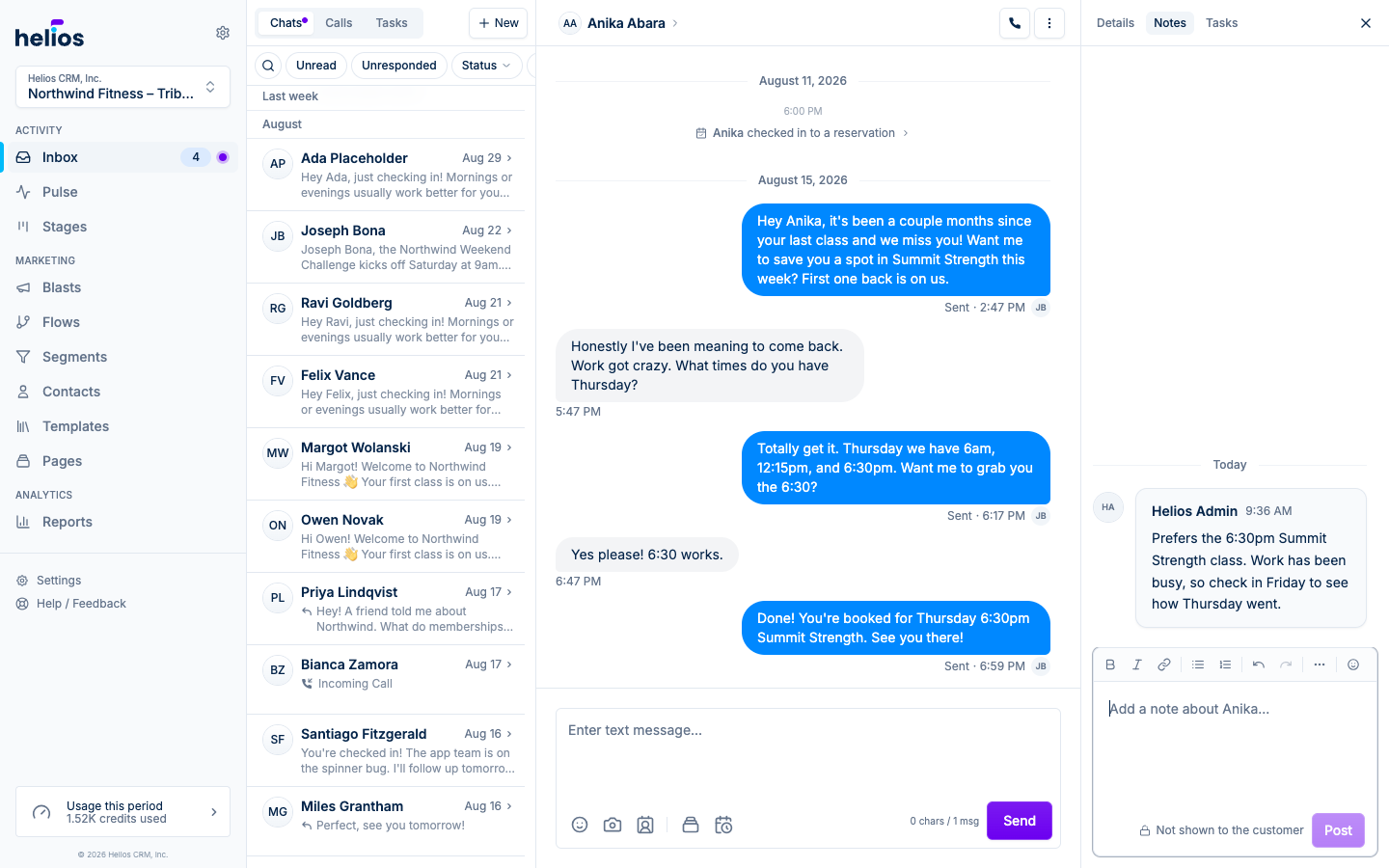
- Notes, laid out like a conversation: the Notes tab is the same notes experience as the contact page, with the newest note at the bottom, day separators, formatting, links, emoji, and inline editing. The composer stays pinned underneath, so writing a note while you read the thread takes one click. Notes are never shown to the customer.
- Tasks with room to work: the Tasks tab lists the contact’s open tasks, switches to Done for history, and creates a pre-linked task with New. Click any task to open it right in the sidebar.
- Back to where you were: opening a membership, reservation, or task from any tab shows a breadcrumb in its place, and the first crumb returns you to that tab. On phones and tablets the same tabs sit in the contact drawer’s header.
Read more in The contact sidebar.
September 16, 2026
The contact profile now puts the person on the left and the work on the right. The details panel is the same contact sidebar you already know from the Inbox, with at-a-glance chips for funnel stage, visits, and reachability, and the tabs beside it open on an overview and hold their notes, tasks, conversation, and activity.
Cards on the Stages board open this profile on Overview, so membership, visits, and notes are ready before you decide how to follow up.
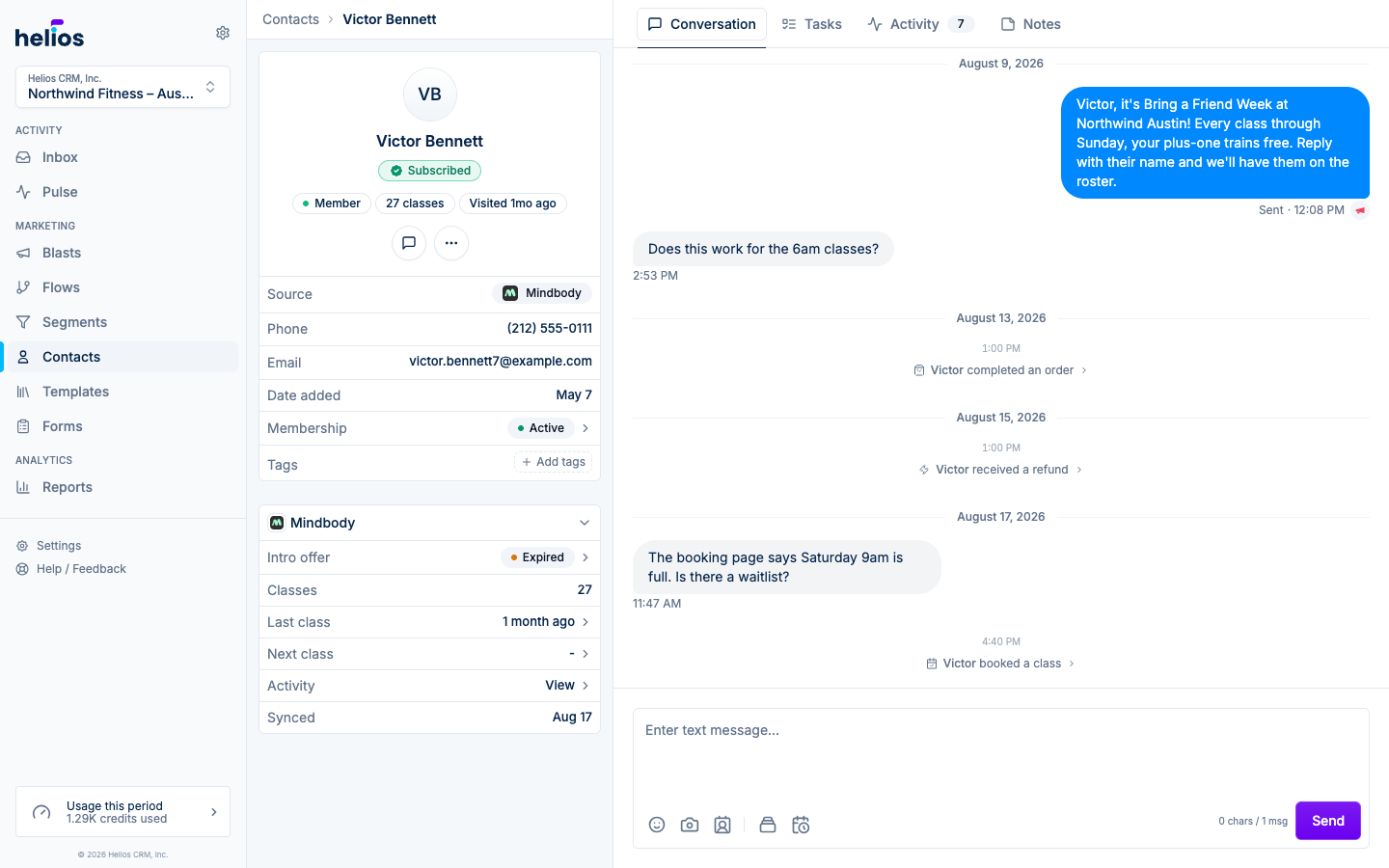
- The overview reads like a briefing: the Overview tab opens with booking-system facts laid out to scan: membership, an active or recently expired intro offer, completed classes, last visit, next booking with the class, credits left, and no-shows. Membership, intro offers, and scheduled visits open their full details. Below it, the Class visit history card shows a year of attendance, one square per day, shaded darker the longer the run of consecutive days it belongs to, with how often they come and their longest streak in the header; hover a day for each class and where it falls in a streak, or switch to any past year on record. Then a Visit log button drops prompts into the note composer (who they came with, what they said, what the coach saw, whether they bought) so a first-timer’s visit takes seconds to record.
- Text from the profile: the Conversation tab shows the contact’s thread with studio events inline, and the composer is right there. No thread yet? Send the first text without leaving the page.
- The person on the left: name, funnel stage, class count, last visit, and reachability as chips, with the key insight when Helios has one, then source, contact details, membership, and tags. The membership row still drills into reservations, passes, and offers.
- Tasks and notes in one place: open tasks for the contact with a quick New task button. Overview keeps note-taking fast with a compact composer, note count, and All notes link, while the Notes tab holds the full history with formatting, links, emoji, and inline editing.
- Navigation that follows you: tabs, Activity and Tasks filters, and open details are reflected in the URL, so browser Back and Forward return through the profile exactly as you used it.
- Built for every screen: phones and tablets use a full-width Details tab, horizontally scrolling navigation, and sheets for drill-downs. Wider screens add the persistent contact panel and place drill-downs beside the active tab when both remain readable.
Read more in Managing contacts.
September 5, 2026
Your customer journey now has its own tab on iPhone. Stages shows who is at each step of the funnel right now, how long they have been there, and the exact message the flow sends them next, so a walk between classes is enough to see where the funnel is leaking and whether Helios is on it.
- Every stage at a glance: the seven lifecycle stages across the top with their counts. Tap one and the page follows; swipe the row to see the rest.
- Two facts the board never had: each person carries a clock for their time at this step, amber and red past the stage’s threshold, and a next line like Text goes out tomorrow, 9 AM or No follow-up scheduled. Anyone who wrote back and is still waiting on an answer stands out in bold; Open in Inbox is the only accent action inside the contact rows.
- Fix it from the page: a stage whose flow is off says so, and turning it on is one hold away. Swipe a person for a text or a call, or tap them to open their contact card.
- Work the list: swipe right to add a task or assign an existing conversation; swipe left to message or call.
To make room, the bar is now Inbox, Contacts, Stages, Pulse, with Dial in the round button at the right end. Settings moved from the More tab to a Settings page behind your avatar, which sits in the corner of every tab; every page is where it was, one tap deeper.
Read the full guide: Stages on iPhone.
September 3, 2026
Pulse is rolling out to studios with a connected booking system. When Pulse lists automated flows that are off, you can open each one, check the messages, and turn them on without leaving the card.
- See the journey: each flow has an Inactive badge. Open the chevron to preview waits, texts, emails, and tasks, and edit a message the same way you do on a playbook review.
- Turn on one or all: Accept activates that flow. Accept all below the list turns on every remaining one.
September 2, 2026
Flows can now send a text when the contact is reachable by SMS, and fall back to email when they aren’t, in a single step.
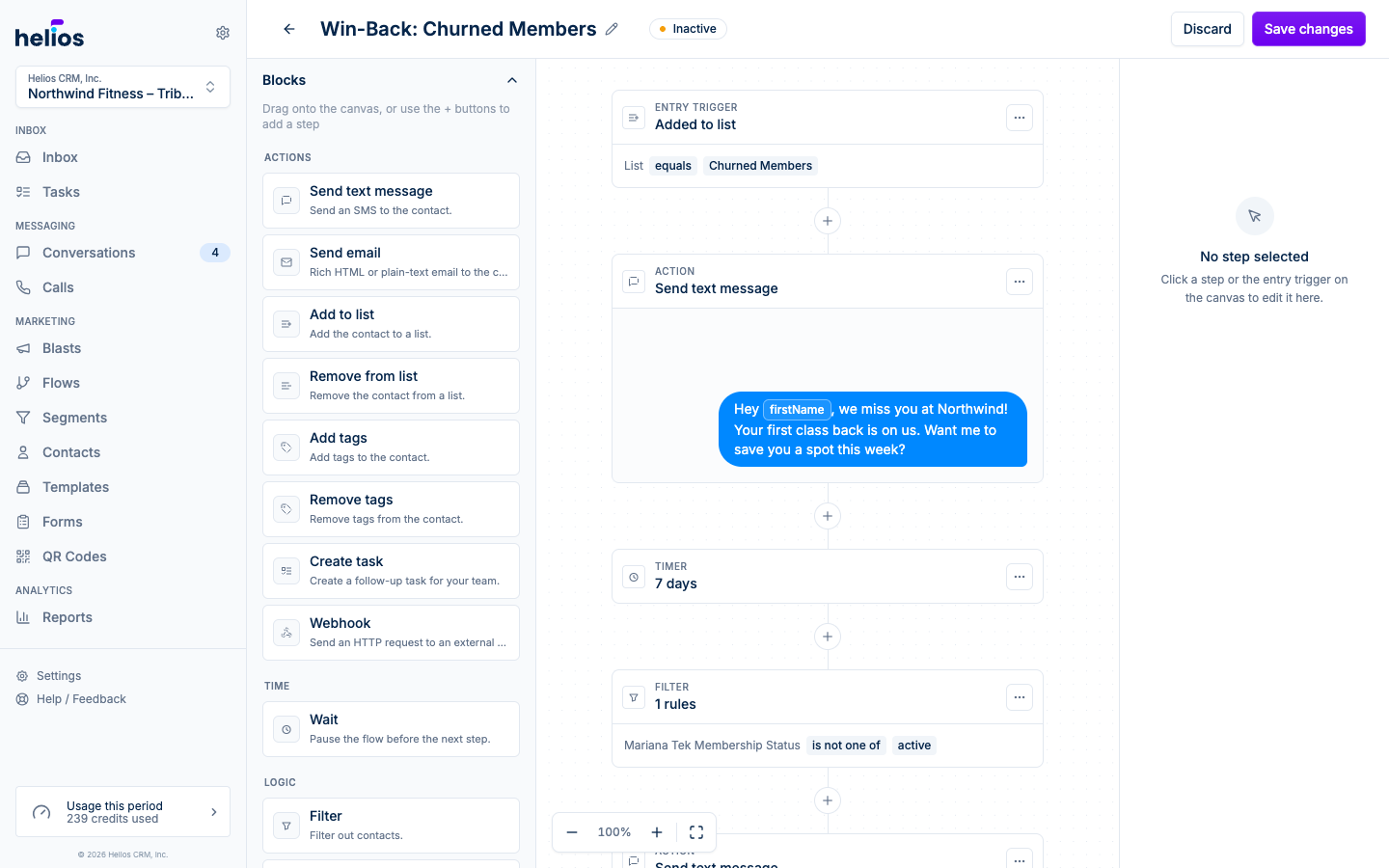
- One step, two channels: add Send text or email from the block palette. Helios texts first, then emails only if they can’t be texted.
- Both sides in one editor: write the SMS (with attachments if you want) and a simple personal email with subject and optional preview text.
- If neither can reach them: skip the step, or create a task so your team can follow up.
See flow actions for the full setup.
September 1, 2026
Inbox is now the conversation list. Click Inbox in the sidebar (or the Helios logo) and you land on your threads, ready to reply.
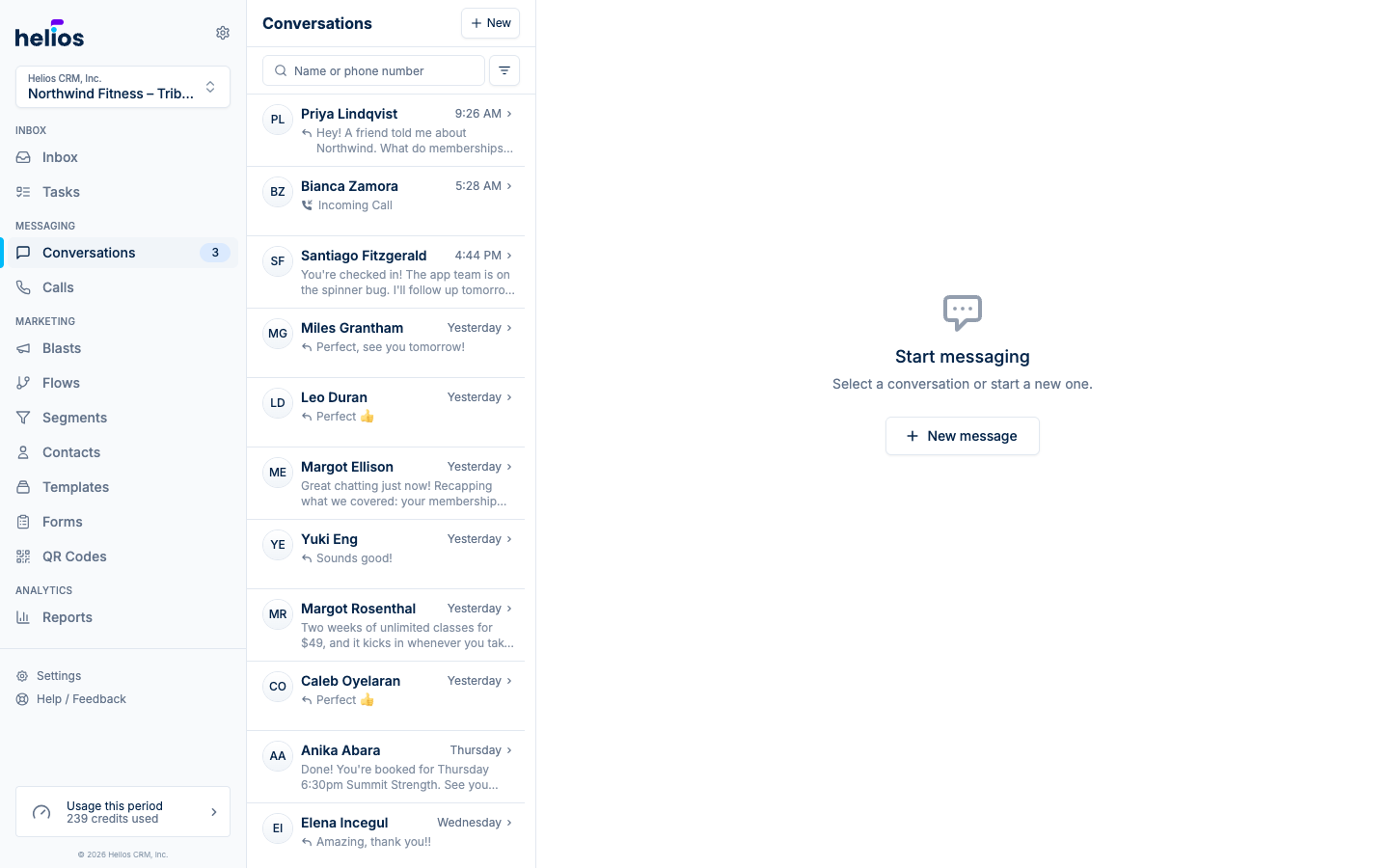
- One home: the old column dashboard is gone. Unread, unresponded, and assignee filters live on the conversation list, where you already work.
- Same tabs: Chats, Calls, and Tasks still switch surfaces without leaving Inbox.
Read more in Sending messages.
August 31, 2026
See who is in each step of the journey on the Stages board, and review inactive playbook flows from the top of Flows. Stages is rolling out to studios with a connected booking system.
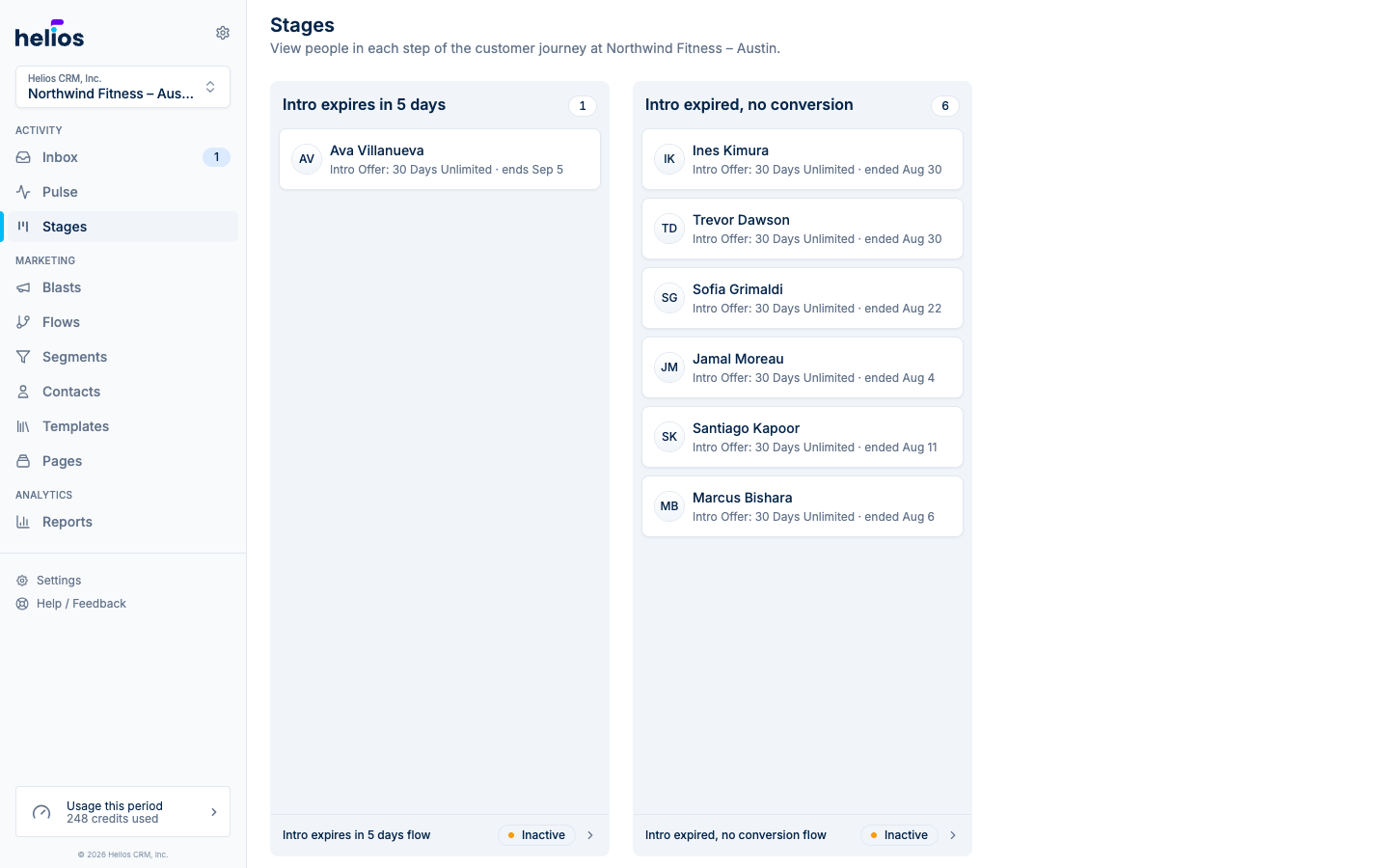
- Stages: an inbox-style board of your locked lifecycle lists, left to right from new lead through dormant member. Click a person to open their conversation.
- Playbooks to turn on: inactive seeded flows sit at the top of Flows. Review one, then start it from the flow itself.
- Tags: filter Flows and Lists by Sales, Onboarding, Intro offer, Retention, Win-back, or Billing.
Read more in the Stages docs.
August 29, 2026
Conversations can open with the one thing worth knowing about that customer. The Key insight card at the top of the contact sidebar reads their profile, activity, and message history, then tells you what matters right now: an intro offer about to expire, a first class booked for tomorrow, a regular who suddenly stopped coming in. It is rolling out to studios with a connected booking system.
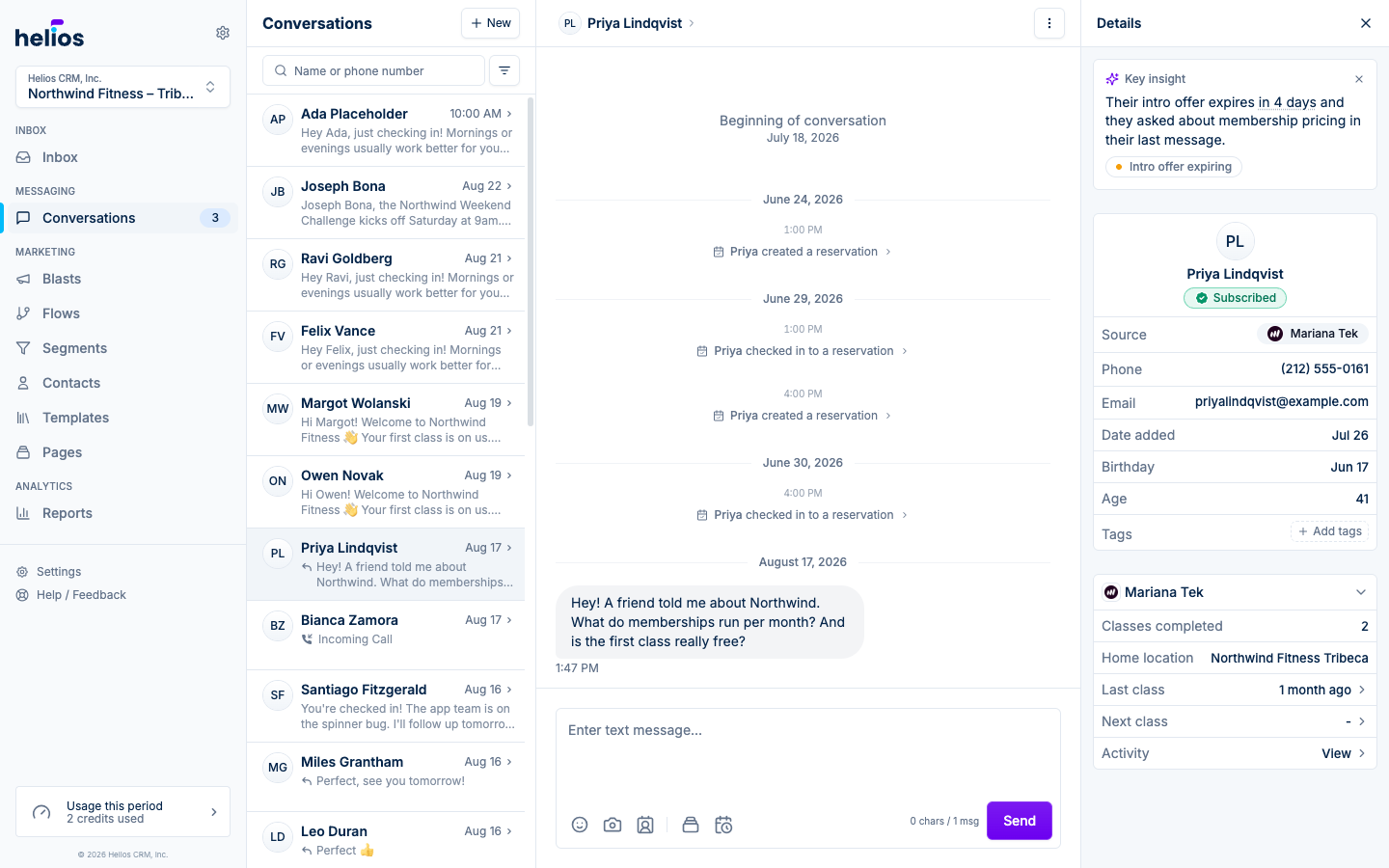
- Always current: insights refresh automatically as new messages and studio events come in, so the card reflects the customer as they are today.
- On the contact page too: the card appears wherever the contact sidebar does, so the context is there even before a conversation starts.
- Dismiss what you don’t need: not useful? Dismiss it. The insight stays hidden until something new changes the picture.
Read more in the contact sidebar docs.
August 27, 2026
Importing contacts from a CSV no longer means guessing at column names and hoping every row made it. The import wizard lives on its own page: you name a static list on the way in, and contacts can now be created with just an email address.
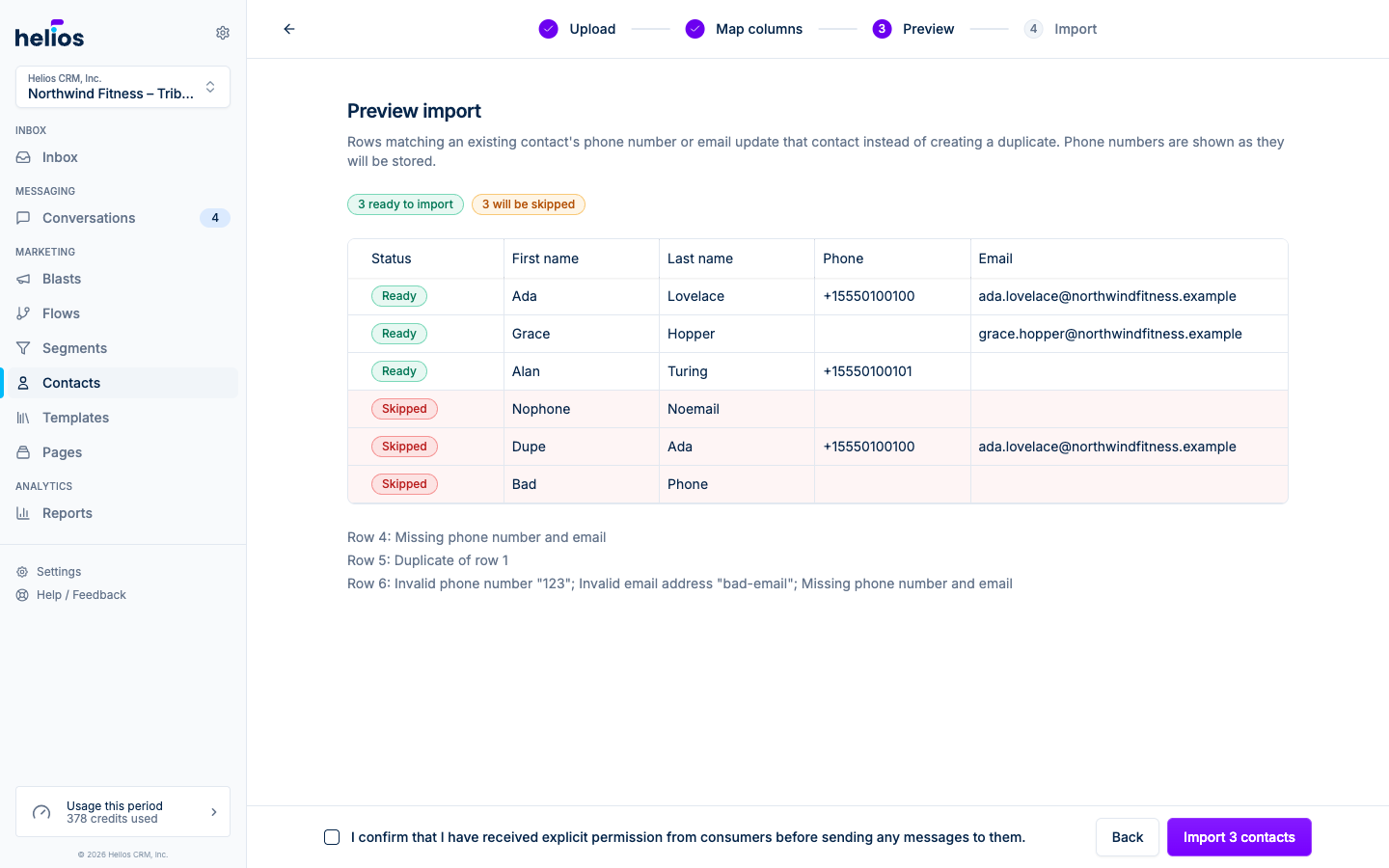
- Map your columns: every column from your file is matched to a Helios field automatically, with sample values so you can check the match. Extra columns become custom properties with a type of your choice (Text, Number, Date).
- Preview before you import: every row is validated up front. Formatted phone numbers, invalid emails, and duplicate rows are flagged with the reason, and the results screen reports exactly how many contacts were created, updated, and skipped, with a downloadable CSV of skipped rows.
- Email-only contacts: a contact now needs a phone number or an email address, not always a phone. Import email-only lists, create email-only contacts by hand, and reach them by email until you have a number.
Read more in the importing and exporting docs.
August 23, 2026
Ask Helios answers come with the receipts: watch what Helios is doing while it works, open the full trail after, and see exactly which records the answer drew on.
- A trail you can open: while Helios works, the line under your question narrates each step. When the answer lands, Thought for Ns expands into the full trail: the reasoning, every lookup it ran, and what each one found.
- Sources under every answer: a sources row lists the contacts, segments, flows, and blasts the answer drew on. Tap one to open it beside the chat.
- Ask about any update, right there: a Pulse update without a prepared action now opens as a conversation. The update leads the page, the composer sits at the bottom, and Helios already knows which update you are reading, so ask exactly what you are wondering.
- A faster composer: @ mentions a specific record, and the microphone dictates your question instead of typing it.
See the Pulse docs for the full tour.
August 19, 2026
Conversations, calls, and tasks are one inbox now, so you can switch between them without bouncing around the sidebar.
- One Inbox item: the sidebar and the mobile tab bar open the combined inbox. Chats, Calls, and Tasks are tabs at the top of that page.
- Less chrome: the old Conversations, Calls, and Tasks sidebar items, and the Messaging section, are gone. The daily dashboard is still behind the Helios logo.
- Composable filters: Unread, Unresponded, and Awaiting reply stack on the conversation list. Status and Assignee default to All (Open, Done, and Prospect are a click away), and search opens from the magnifying glass. The call list uses the same pill bar: search, stackable Missed and Voicemail, and a Direction menu.
- Date groups: the conversation list groups threads by Today, Yesterday, This week, and older months, and the heading stays pinned as you scroll.
August 18, 2026
Mindbody studios now get the same retention toolkit as our other fitness integrations: segment on live membership and attendance data, trigger flows from booking outcomes, put a weekly class schedule on a landing page, and filter check-ins by class name.
- Connect is the full product: a new connection imports clients, the catalog, the class schedule, and membership and attendance history, then keeps those properties current. Starter segments and flows are defaults you can edit; the flows stay inactive until you turn them on. ClassPass dummy phones do not become Helios contacts. Clients Mindbody marks as ClassPass get a ClassPass user flag you can segment on.
- Segments, flows, and the contact sidebar: build rules on active membership, class pack sessions remaining, intro offer windows, attendance recency, and purchases. Prebuilt templates cover intro conversion and win-back. Booking outcomes (attended, cancelled, late cancelled, no-show) can start or stop flows, including “booked but didn’t attend”. The sidebar shows memberships, class packs, intro offers, bookings, and purchases.
- Class name on bookings: check-ins, cancellations, and no-shows carry the class name, instructor, start time, and location, so you can build segments like “checked in to Reformer”. Pricing option stays the pack or membership used to pay.
- Live schedule on landing pages: add the Schedule block to a landing page and visitors see the week with cancelled sessions removed. Reserve opens that studio’s Find a Class page in Mindbody. Choose which locations sync, and use Sync now on the integration page to refresh the catalog and class schedule.
Read more in the Mindbody integration docs.
August 15, 2026
No more dark-gray-on-black surprises: every email Helios sends now adapts its colors to the recipient’s dark mode automatically, and the builder helps you catch hard-to-read color choices before you hit send.
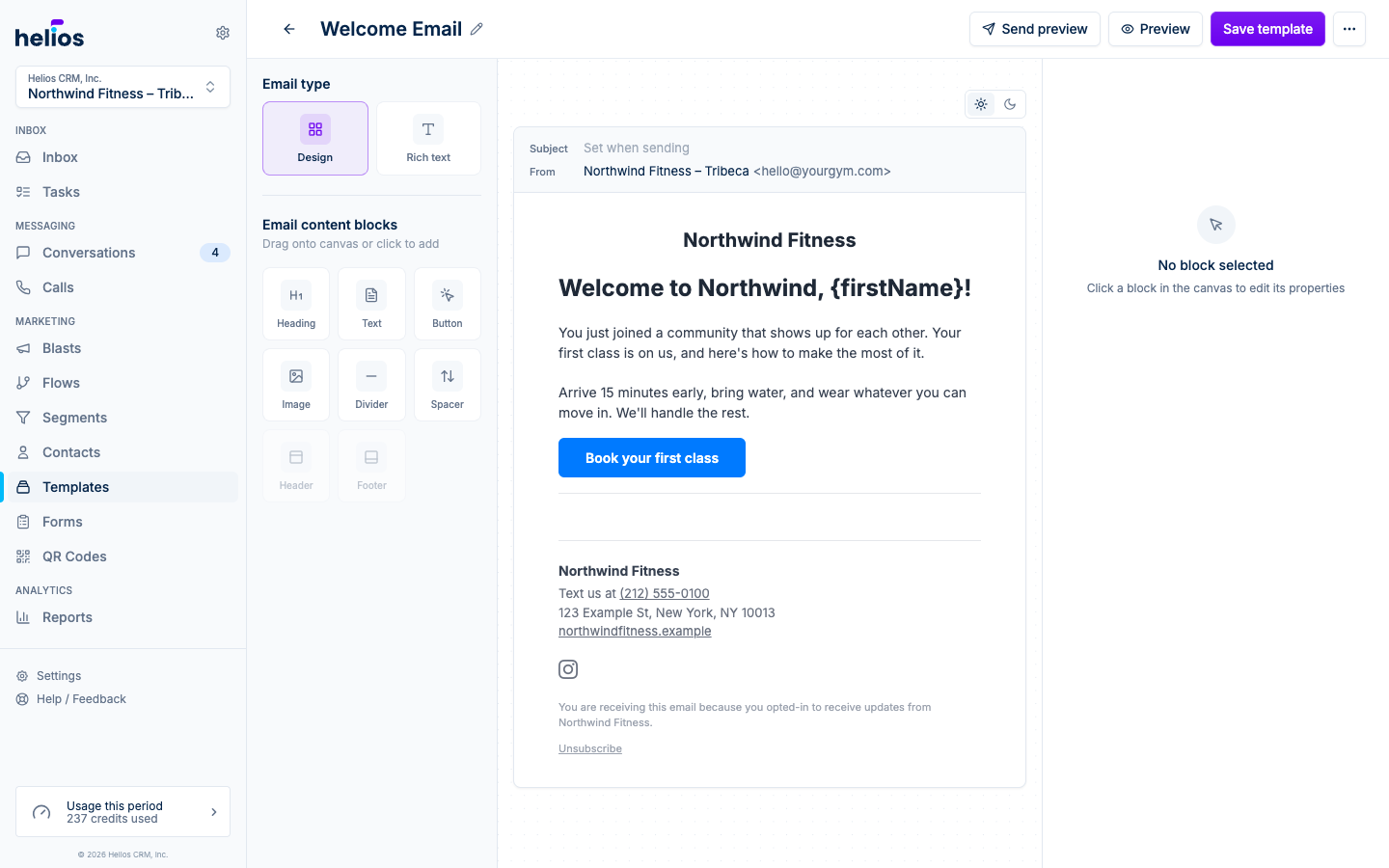
- Automatic dark-mode adaptation: custom text, heading, and divider colors that would disappear on a dark background are brightness-adjusted (your hue stays intact) so the email is always legible. Sections with their own background keep their design untouched.
- Author the dark version yourself: flip the canvas to Dark mode and the inspector edits dark-only color variants. Auto shows what Helios derived; pick your own to override it, or reset back anytime.
- Contrast warnings: the inspector flags color combinations below the 4.5 readability guideline in both light and dark mode.
Full details in the email template builder guide.
August 15, 2026
The form Performance tab now matches landing pages: pick a date range, toggle unique visitors, submissions, and conversion rate on the chart, and scan Events, Referrers, and every submitter in one place.
- Chart and date range: the same period control as page performance, with series you can turn on and off.
- Events and Referrers: views versus submissions for the period, plus where unique visitors came from (Helios, Direct, social, or the site they were on). When UTMs are present, open UTMs and pick a field that has values (Source, Medium, Campaign, Term, or Content).
- Submissions: click a person to see their answers and message them from the panel. The table stays Person, Date, Source, and View.
- Inbox: tapping a form or page event in a conversation opens the answers, the page or click, and campaign source in the contact sidebar.
August 15, 2026
Every form’s submissions can now leave Helios in one click. Open a form’s Performance tab and use Download CSV in the Submissions table to export the full history, ready for spreadsheets, imports, or reporting.
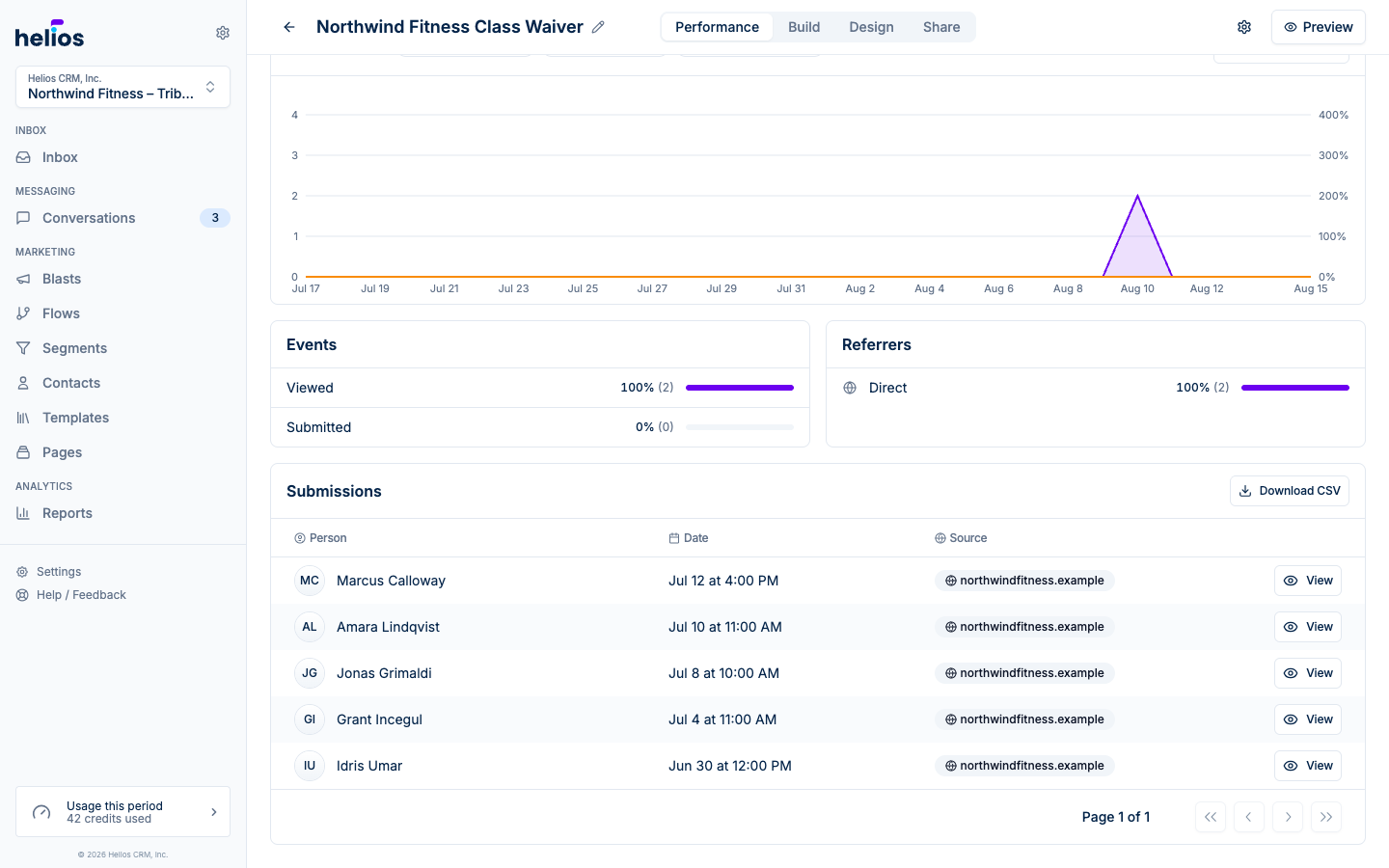
- The complete list: the export includes every submission, not just the page on screen.
- One column per question: contact details (name, phone, email), date, and source come first, followed by each form question labeled exactly as it appears in the app.
See the Submissions docs for everything the table can do.
August 15, 2026
Pages now helps you start with the visitor action you want, then builds a focused landing page around it. Choose a goal, use conversion-ready recommendations from your synced data, and arrange the page directly on the canvas.
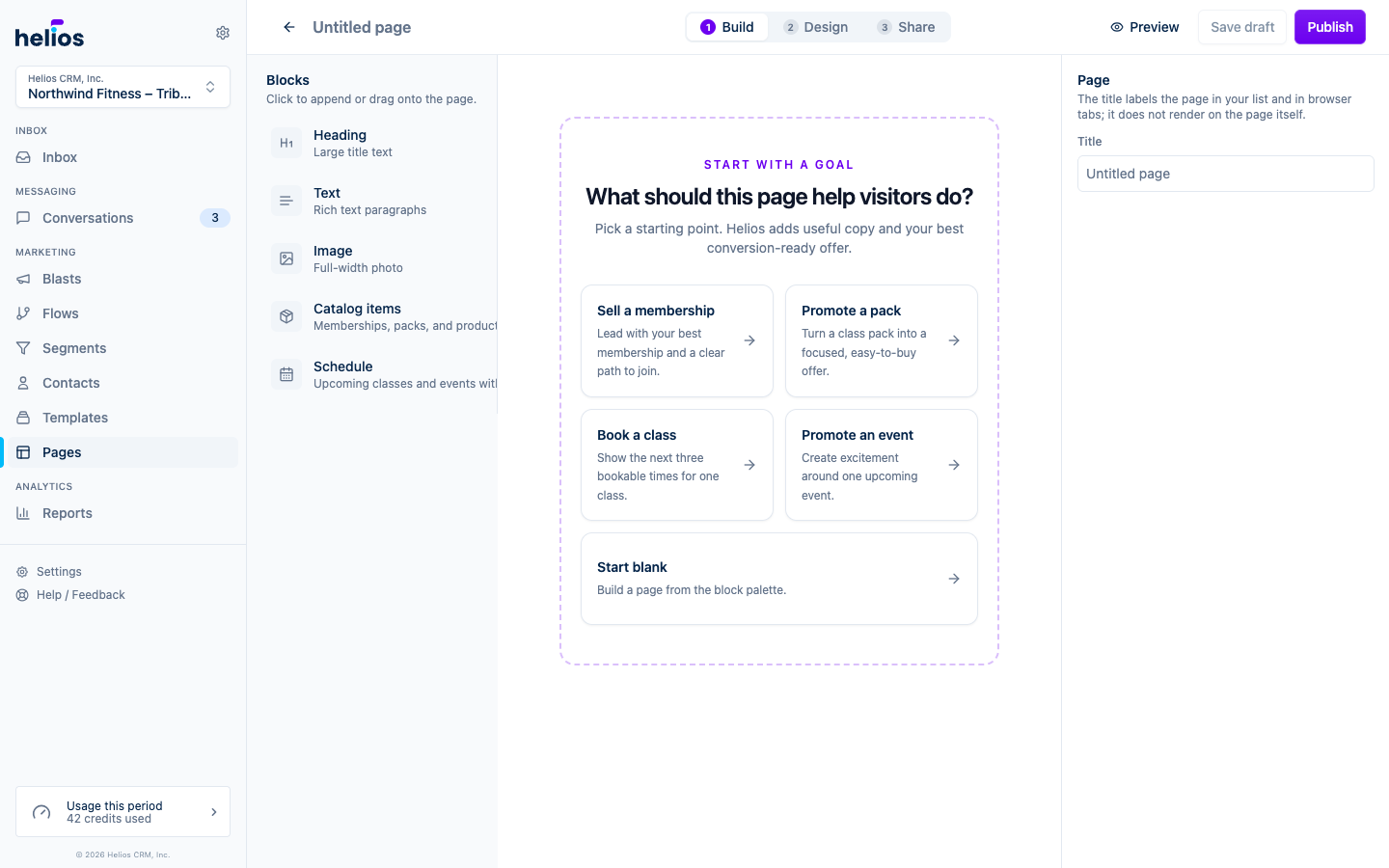
- Start with a goal: choose a visitor outcome (intro offer, membership, pack, class, event, or weekly schedule), or start from scratch.
- Pick offers that can convert: recommendations prioritize active records with working checkout or booking links and explain when a record needs attention.
- Build on the canvas: drag blocks into place, select them to edit, and use the block toolbar or keyboard to reorder, duplicate, and delete.
- Showcase commerce clearly: featured offers get a strong checkout action and branded image fallback, while event blocks stay focused on the next few bookable times or one promoted event.
- Put your whole schedule on the page: the new Schedule block is a browsable weekly schedule with day tabs, class descriptions, a limited-spots warning when a class is filling up, and the right action on every session (Reserve, Join waitlist, Full, or Ended). It syncs from your booking software hourly with nothing to maintain.
- Frame the page with your brand: optional Header and Footer blocks pin your logo to the top and your contact info and links to the bottom, pre-filled from your Brand kit and inbox settings.
- Use your own photos: click the thumbnail on any picked item to upload a custom card image that replaces the synced one on that page, with the synced image one click away.
- Catch hesitant visitors: adding a Footer also adds a “Send us a text” button that starts a text to your Helios number, so undecided visitors turn into conversations in your inbox. On by default when a Footer is on the page, with a switch on the Footer to turn it off.
See Landing pages for the full guide.
August 15, 2026
You can now build segments and flows from what people do on Helios forms and pages, not only from your booking software.
- Website events: under What someone has done, every gym gets form views and submissions, landing page views and clicks, plus account creation and checkout on a Helios booking page. These events appear when the contact is identified (for example from a tracked message link).
- Journey chips: pick Viewed a page, Submitted a form, or Completed Helios checkout without digging through the full event list.
- Flow triggers: start a flow when someone completes checkout or creates an account on a Helios page.
See Dynamic segments for how event rules work.
August 12, 2026
Forms that collect an email address now ask for email marketing permission alongside the existing texting consent, so every submission tells you exactly which channels the contact said yes to.
- Email consent checkbox: forms that collect email show “Send me news and offers by email” below the texting checkbox. It starts checked, which US email rules allow, and visitors can untick it. The texting checkbox still starts unchecked, as texting rules require.
- Updated legal pages: the fine print, Terms of Use, and Privacy Policy generated for every form now cover email marketing, unsubscribe links, and how email and texting preferences stay independent.
- Rename forms in the header: click the form title at the top of the builder to rename it in place, the same way email templates work.
- Cleaner link previews: form subtitles with rich text formatting no longer show raw formatting tags in the share card, texted link previews, or social unfurls.
See Building forms for details.
August 11, 2026
Two builder improvements that came straight from customer feedback: forms can collect write-in answers, and fitDEGREE memberships show up in flow and segment rules before anyone buys them.
- Other option on choice fields: for Dropdown, Radio group, and Multi-select, turn on Include Other option. Visitors who pick it get a short write-in, and their typed answer is saved on the contact.
- Search your sellable catalog in rules: when configuring a flow exit trigger or segment condition on a fitDEGREE purchasable name, type to search your full membership and pack catalog. You no longer need a real purchase before a product appears in the picker.
- Form Preview: the full-screen Preview button next to Save now stays in sync with your draft as you edit.
See Building forms for the Other option, and Flow triggers for exit criteria.
August 11, 2026
Building the page around a form is now direct: add heading and text blocks, edit them in the settings panel like the form header, and drop blocks into clearly labeled regions above or below the form. Form views are now unique visitor views, so your conversion rate reflects real people.
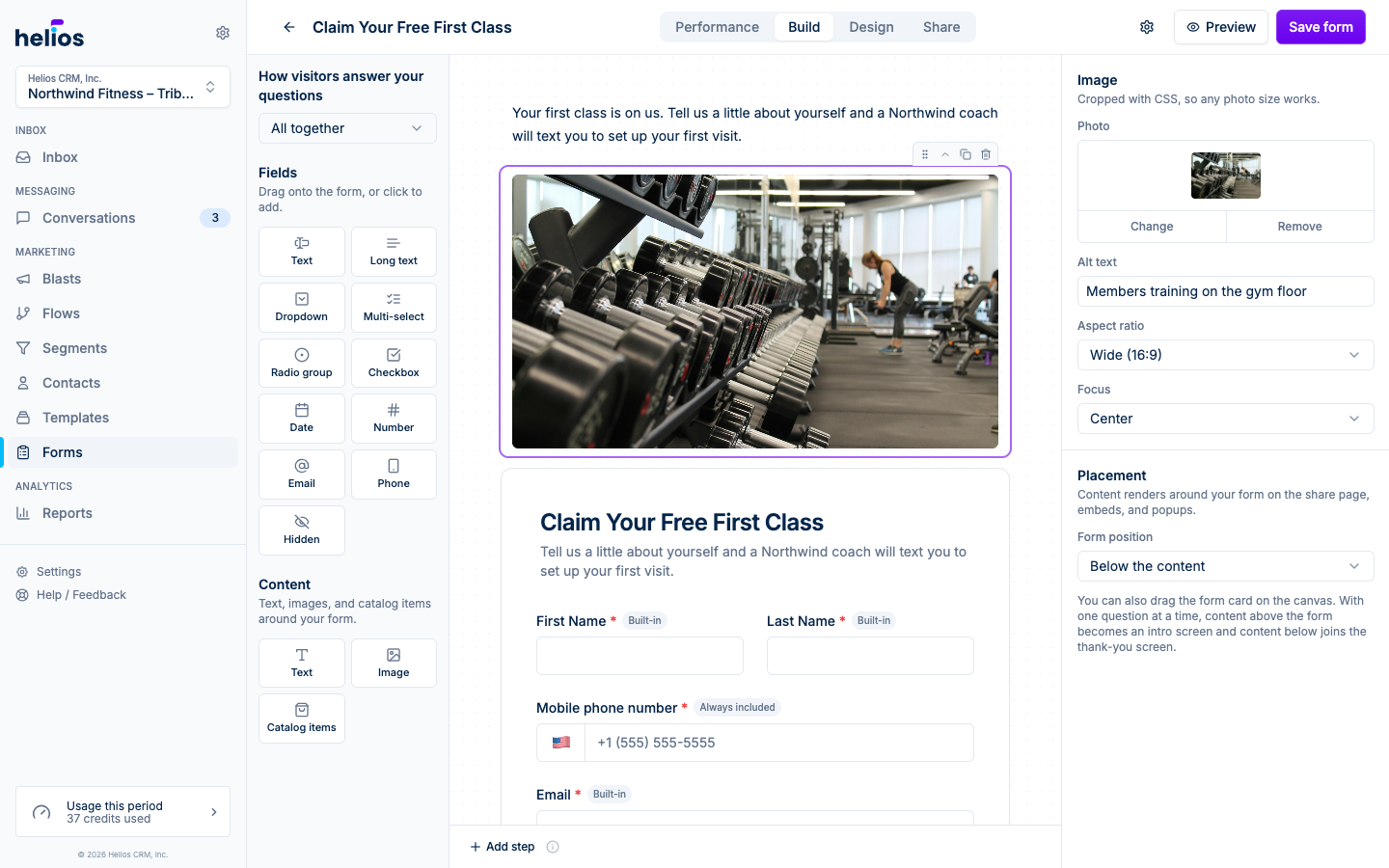
- Heading blocks: lead the page with large title text in two sizes. Text blocks support bold, italics, links, and lists.
- Clearer page layout: the canvas shows two labeled regions with the form between them, and the labels follow your question flow. All-together forms show content above and below the card; one-at-a-time forms show it inside the form as the Intro screen and Confirmation screen it becomes. Drag blocks within or between regions, no guesswork.
- Editable confirmation screen: the title and confirmation message now show on the Build canvas exactly as visitors see them. One-at-a-time forms show them in the Confirmation screen region below the questions; all-together forms get a Confirmation tab next to the step tabs. Click the screen to change the title, edit the copy, or switch to a redirect.
- Card or no border: a new Frame design option shows the form on a card (the default) or drops the border so the questions sit directly on the page. With no border, your background color fills the page instead of the card.
- QR code for your link: the Share tab now includes a ready-to-print QR code for the hosted form link. Download it as a high-resolution PNG for flyers, posters, and the front desk.
- Rich text subtitles: the form subtitle keeps your line breaks and formatting, so multi-line intros render the way you wrote them.
- Unique views: the Performance tab counts each visitor once, so refreshes and repeat visits no longer inflate views or dilute your conversion rate.
See Building forms for details.
August 10, 2026
Import your gym’s colors, logo, font, and voice from your website, then reuse those defaults across Helios.
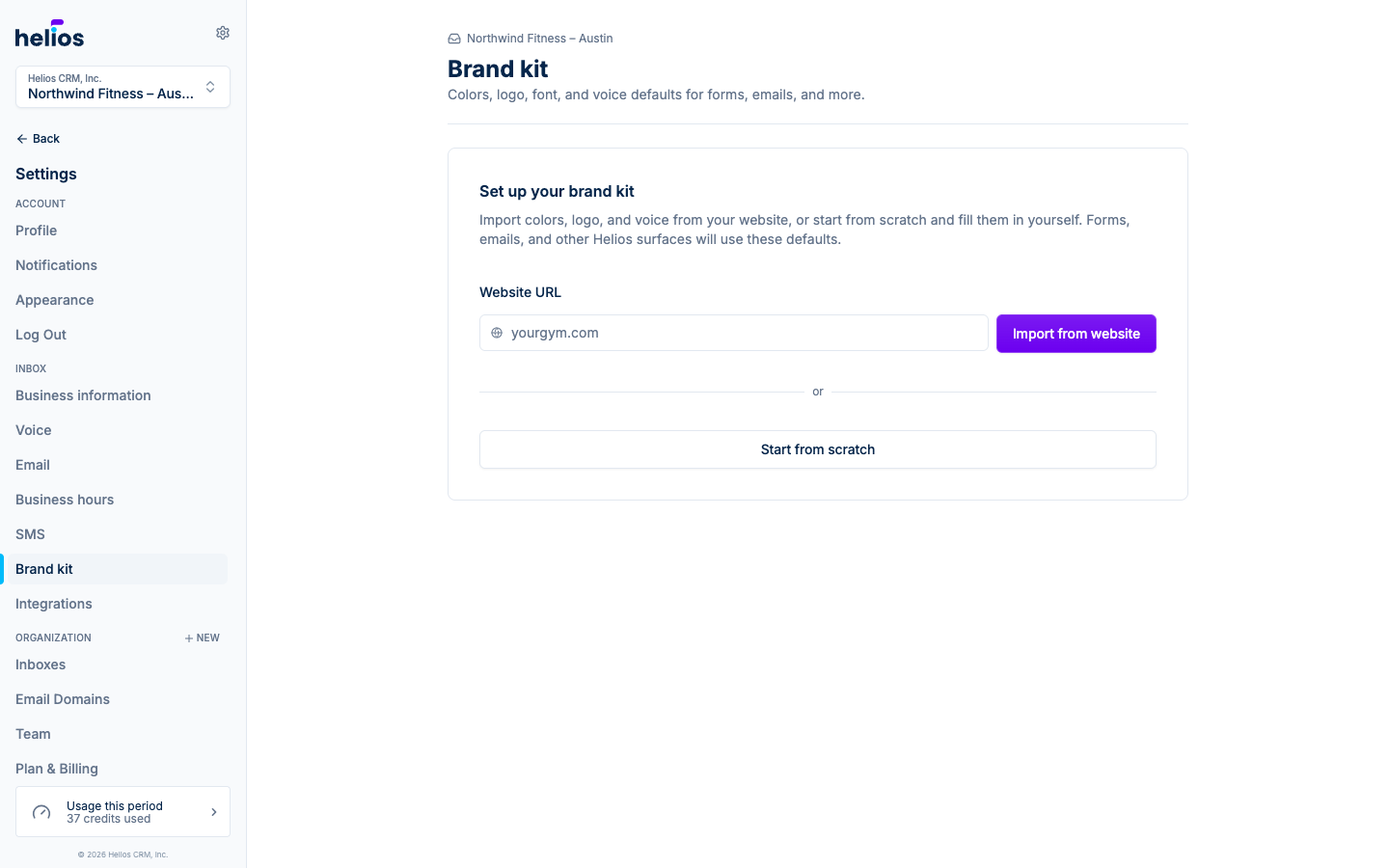
- Website import: paste a URL and Helios reads the homepage to draft a brand kit you can review.
- Four-step wizard: edit basics, colors, font and style, and guidelines with a live light/dark preview.
- Seeds new forms and emails: once a kit is ready, new forms open on-brand and new email templates carry the kit logo and button colors. Existing artifacts stay as you left them.
See the Brand kit docs for the full walkthrough.
August 9, 2026
Forms now look great everywhere without fiddling. Pick one brand color and Helios builds matching light and dark palettes with readable contrast, follows each visitor’s light or dark setting automatically, and keeps every layout sharp on phones.
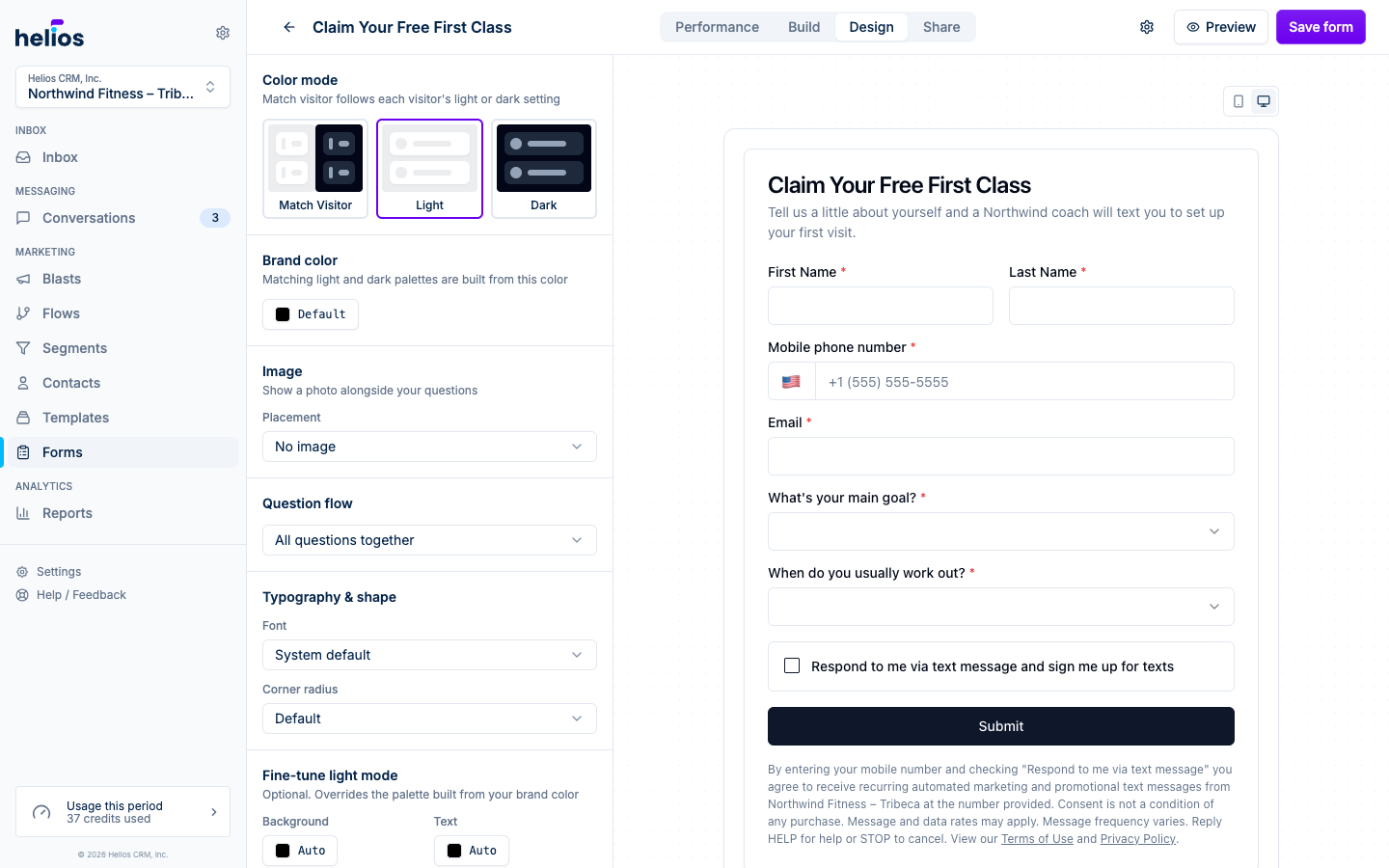
- Match visitor color mode: forms adapt to each visitor’s light or dark preference. Lock a mode or fine-tune individual colors when you need to, and preview both modes and phone or desktop widths right in the builder.
- Full-page takeover: a new way to show a form on your website. Instead of a small popup, the form fills the screen when a trigger fires, which is a much better experience on phones, where most gym visitors are.
- Image layouts and guided flow: add a photo above or beside your questions, and switch to one question at a time for a guided flow with a progress bar and Enter-to-advance.
See Building forms and Sharing and embedding forms for details.
August 9, 2026
Build, publish, and improve lead capture forms from one focused workspace. The new form builder adds flexible questions, multi-step experiences, conditional logic, website popups, and conversion reporting without giving up the hosted links and embeds you already use.
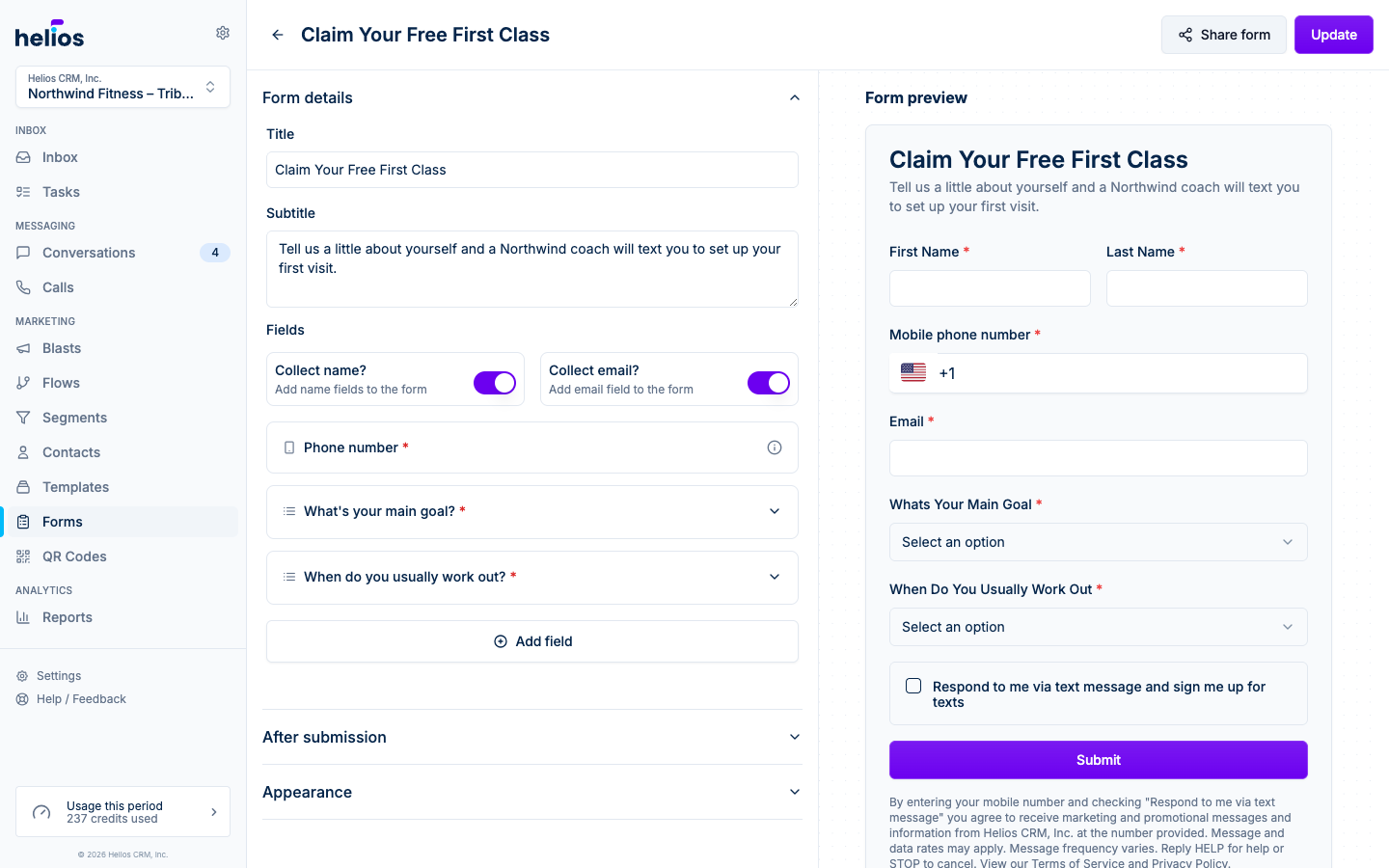
- Build the experience you need: drag questions into place, collect multiple selections, add validation and conditional logic, or split a longer form into clear steps.
- Share it anywhere: send a hosted link with a branded text and social preview, embed a responsive form directly in a page, or open it as a targeted popup.
- Measure and follow up: compare views with submissions, see conversion rate, read exact field labels and multi-select answers, then message the contact from the response table.
- Edit from any device: the builder adapts to the screen you are on, so you can fix a question or check yesterday’s submissions from a tablet or your phone.
See Building forms and Sharing and embedding forms for the full setup.
August 4, 2026
Flow email steps can now send to an address you enter, not only the contact’s email.
- Contact email by default: existing send email steps keep going to the contact.
- Custom recipient: in the step’s settings panel, set Send to to Custom email address and enter who should receive the message instead.
- Internal notifications: useful when a registration or milestone should alert your team while the contact still drives the rest of the flow.
See flow actions for details.
August 4, 2026
Pre-class flows just got a lot smarter. Timers can now wait relative to the class start time from the trigger event, and filters and conditionals can check the exact booking that started the flow, not just the contact’s overall history.
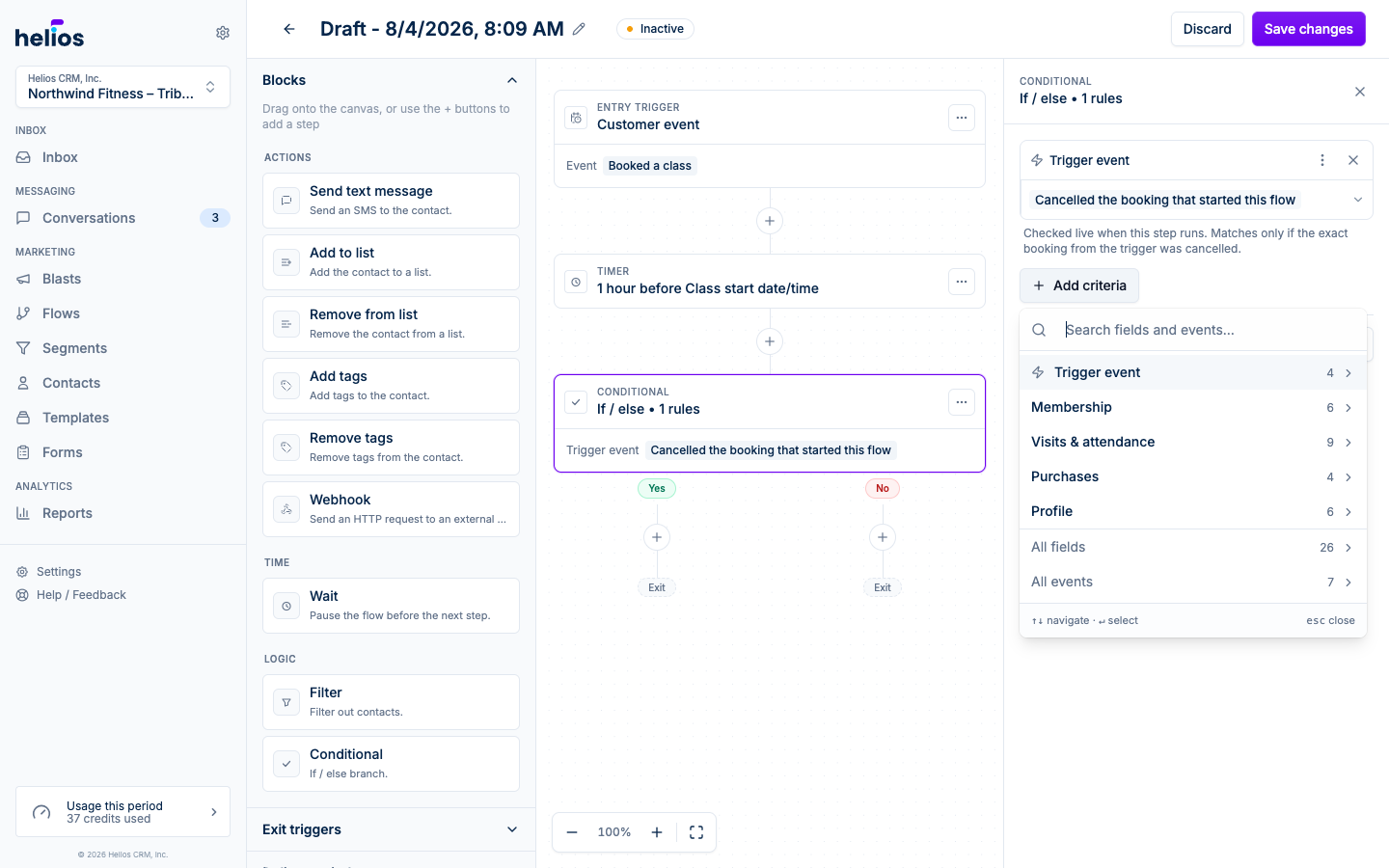
- Wait until 1 hour before class: “Wait until a specific date” timers now offer booking date fields like Class start date/time, so every contact gets their reminder relative to their own class, not a fixed delay.
- Did they cancel that booking?: the criteria menu’s new Trigger event category adds one-click checks like Cancelled the booking that started this flow, Still booked (hasn’t cancelled), Checked in to the class, and Missed the class (no-show), evaluated live when the step runs. No more skipping a reminder because the contact once cancelled a different class.
- Every value in dropdowns: trigger and condition dropdowns (class names, membership names, and more) now list every value from your booking system instead of a sample.
See Logic and timing for how to build a pre-class reminder that skips cancelled bookings.
August 3, 2026
The New incoming text message trigger has a new Any message match type, so a flow can start whenever a contact texts you back, no keyword required.
- Any message: fires on every incoming text, whatever it says. Great for auto-replies, tagging anyone who responds, or routing every inbound reply into a follow-up.
- Still keyword-ready: Contains any and Exact match work exactly as before for keyword campaigns like “text JOIN to sign up”.
See flow triggers for the full list of ways contacts enter a flow.
July 25, 2026
Flow SMS steps can now send MMS the same way the inbox and blasts do.
- Image attachments: add a JPEG, GIF, or PNG from the send text message composer toolbar.
- Contact cards: share your inbox vCard so contacts can save your number in one tap.
- Templates included: SMS templates with media keep their attachments when you use template mode in a flow.
See flow actions for details.
July 21, 2026
Verifying an email domain used to mean figuring out your DNS provider’s quirks on your own. Now Helios walks you through it: pick your DNS provider (Squarespace, GoDaddy, Wix, or anything else) and follow three simple steps with values already formatted for that provider’s fields. No technical knowledge needed.
- Guided setup wizard: choose your provider and get click-by-click instructions with copy buttons for every value, matched to your provider’s exact field names.
- Smart error detection: click “I’ve added the records, check them” and Helios pinpoints what’s wrong, whether a record was saved under the wrong name, a value doesn’t match, or DNS just needs more time, with plain-language fixes for each.
- Full written guide: the email domains guide covers every provider in depth, including how to find out where your DNS is actually managed.
July 17, 2026
Settings got a full restructure: a persistent secondary navigation, dedicated pages for each inbox, and recorded voicemail greetings.
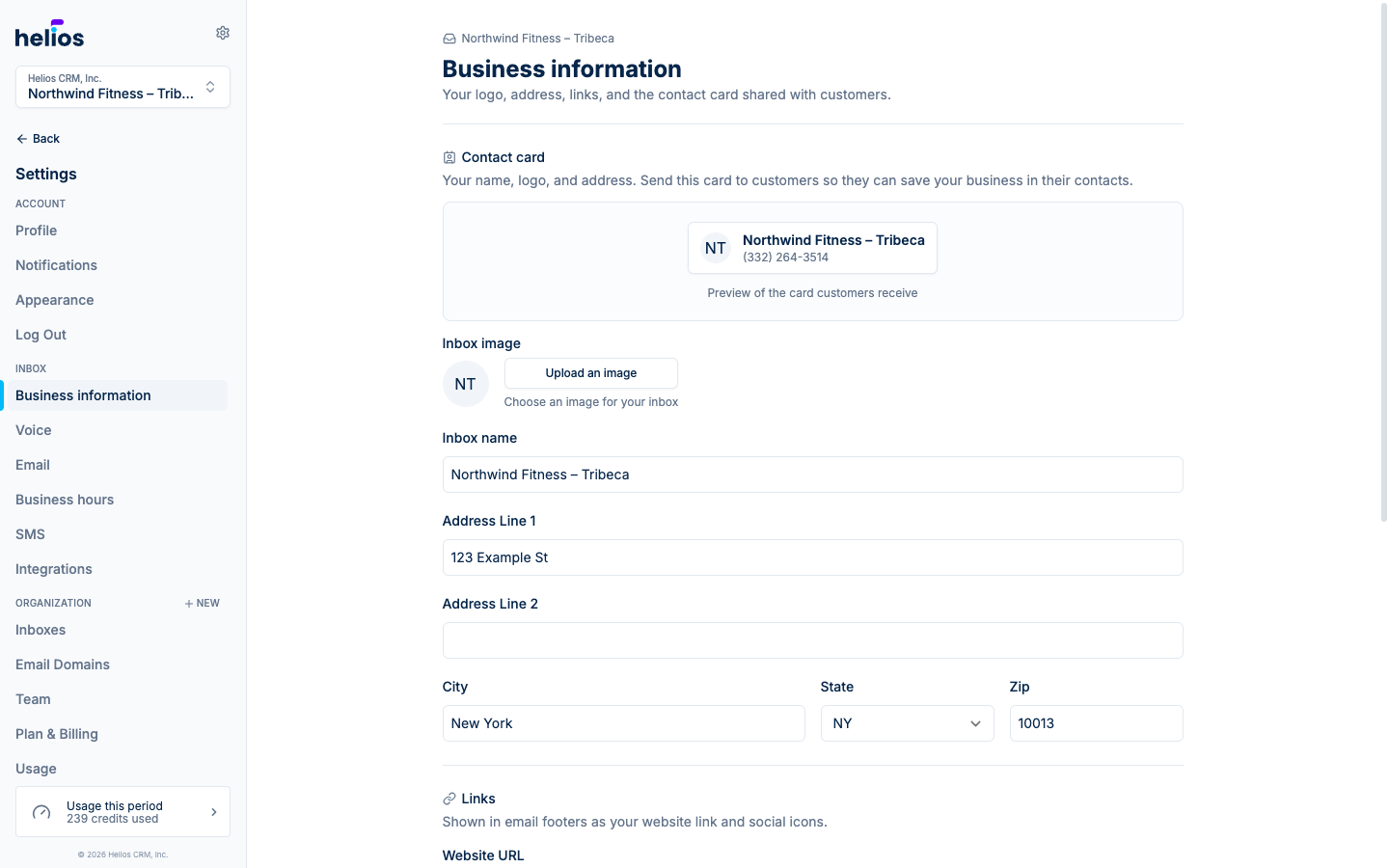
- Secondary navigation: every settings area is one click away in a sidebar grouped by Account, Inbox, and Organization, so you always know where you are and can jump between pages without backing out.
- Per-inbox settings pages: each inbox now has focused pages for Business information, Voice, Email, Business hours, and SMS instead of one long form. Switching inboxes keeps you on the same page.
- Recorded voicemail greetings: record a greeting right in the browser (or upload a file) instead of relying on text-to-speech. Hear it back before you save it.
See the inboxes and phone numbers docs for the full tour.
July 15, 2026
Work that starts in a conversation no longer has to live in a separate app. Tasks bring follow-ups, callbacks, and team to-dos into Helios, linked to the contacts and conversations they came from.
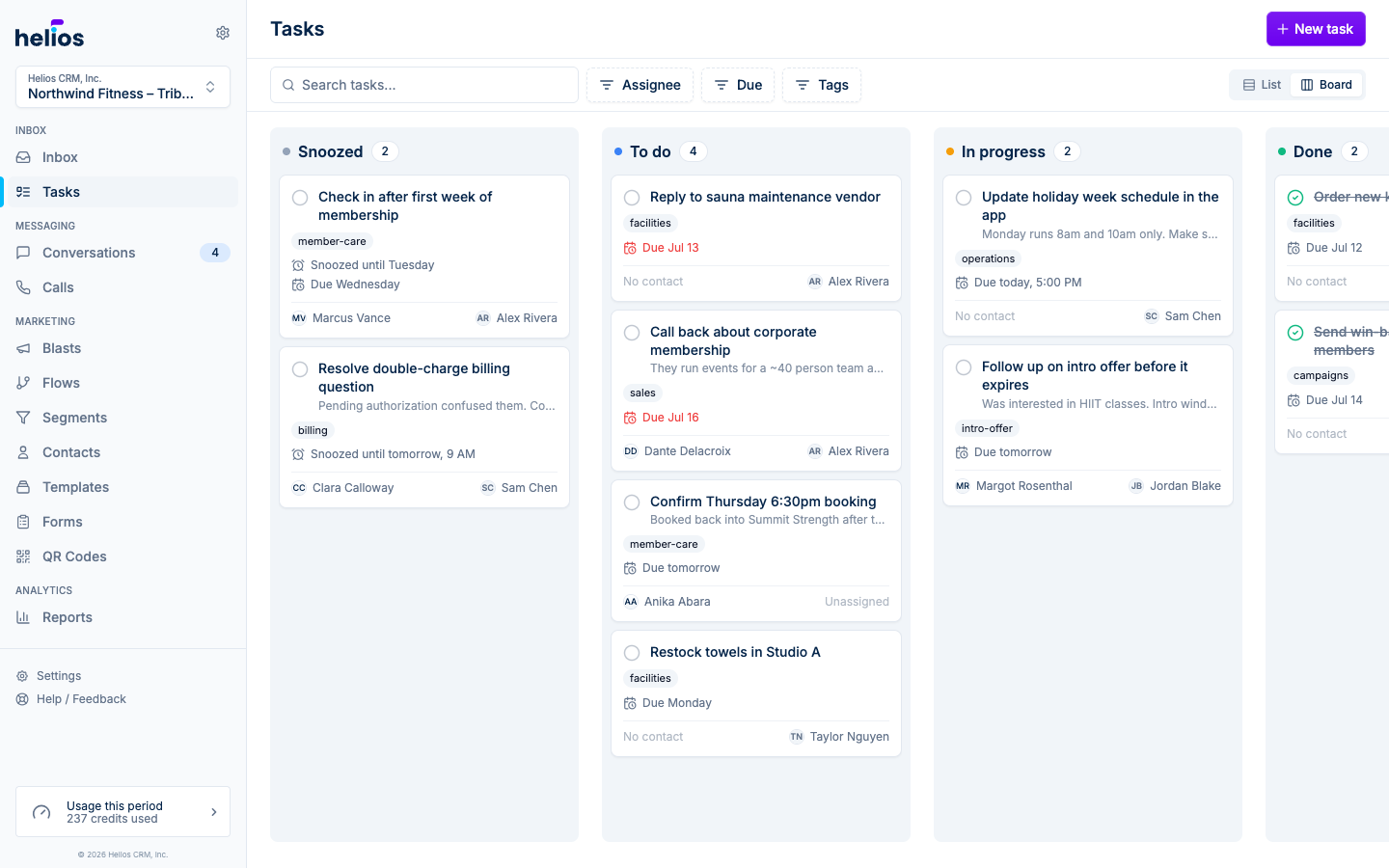
- Board and list views: a new Tasks page in the sidebar with a drag-and-drop board (Snoozed, To do, In progress, Done) and a grouped list view, plus filters for status, assignee, due date, and tags.
- Create tasks anywhere: from the Tasks page, the inbox Create new menu, a conversation’s actions menu, the contact sidebar, or automatically from a flow.
- Assignment with notifications: assign tasks to teammates and they get a push notification on web and iOS; due-soon and overdue reminders go to the assignee.
- Snoozing: hide a task until later today, tomorrow, the weekend, next week, or a custom time. It returns to To do and pings the assignee when it wakes.
- Comments and history: discuss each task in a comments thread and review a full audit trail of assignments, status changes, and edits.
Read more in the Tasks docs.
July 14, 2026
Bookings, purchases, and membership changes from your connected booking system now appear inline in the message thread, in chronological order with the messages themselves.
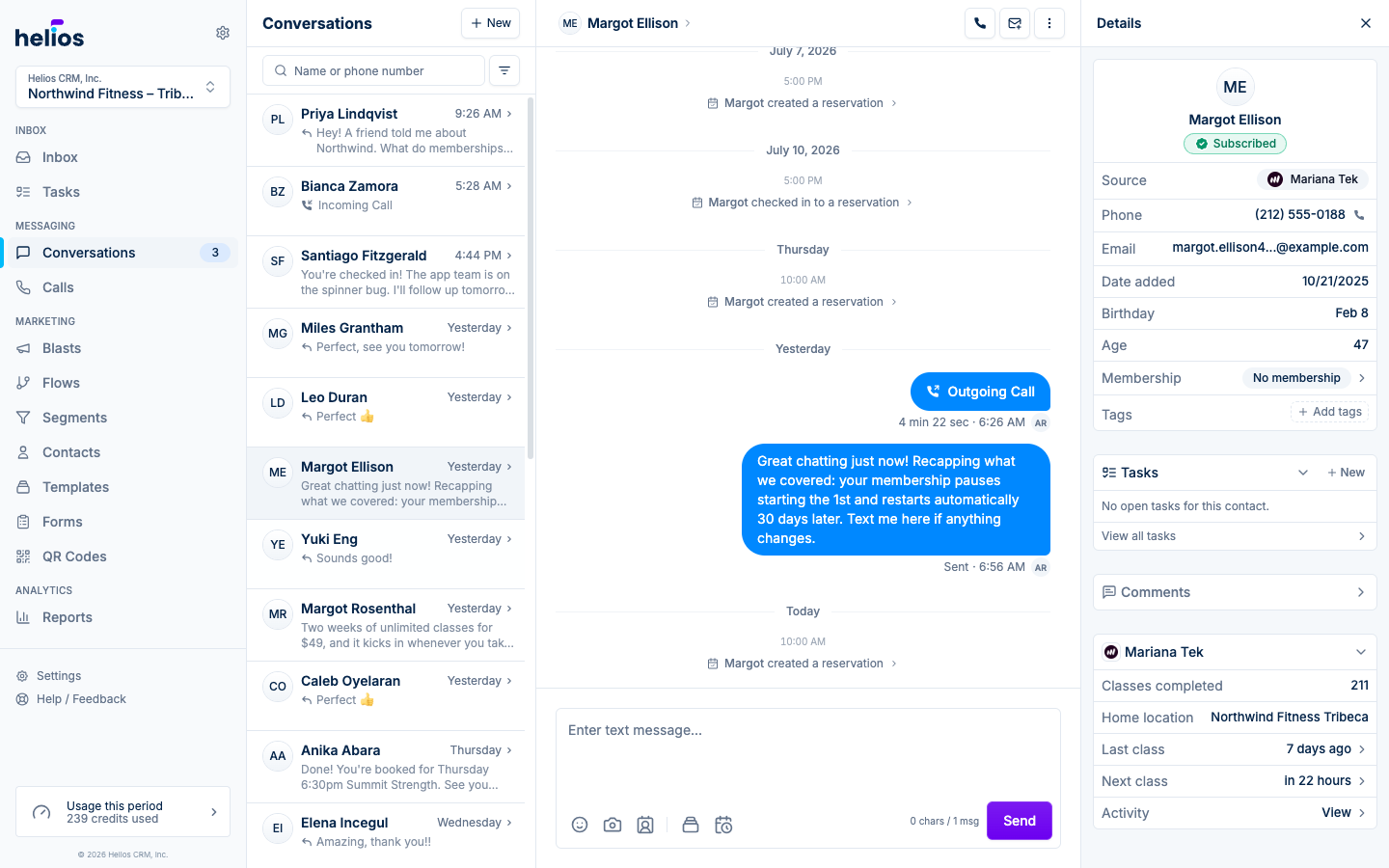
- Activity markers in the timeline: see “reserved a class” or “purchased a membership” exactly where it happened in the conversation, so replies always have context.
- Click for details: tapping a marker opens the full event in the contact sidebar, with the same reservation, order, and membership cards used on the contact record.
- Live updates: new activity streams into open threads in real time, no refresh needed.
Works with every integration that syncs customer events. See the contact sidebar docs for the full context picture.
July 12, 2026
Using Helios from a phone browser got a ground-up navigation pass.
- Bottom tab bar: an iOS-style tab bar (Inbox, Messages, Calls, Contacts, More) replaces the hamburger menu, so the places you live are always one tap away.
- Detail pages that fit: contact, blast, flow, and template pages restructure their side panels into bottom drawers on small screens, with primary Message, Email, and Call actions up top on the contact page.
- Small things that add up: no more accidental zoom when focusing inputs on iOS, call controls stay reachable while a call is docked, and the inbox columns snap-swipe on phones.
For the full native experience, there is always the iOS app.
July 11, 2026
The Reports page grew from one view into a full analytics suite that answers the questions owners actually ask: where do leads come from, do they convert, and how healthy is the membership base?
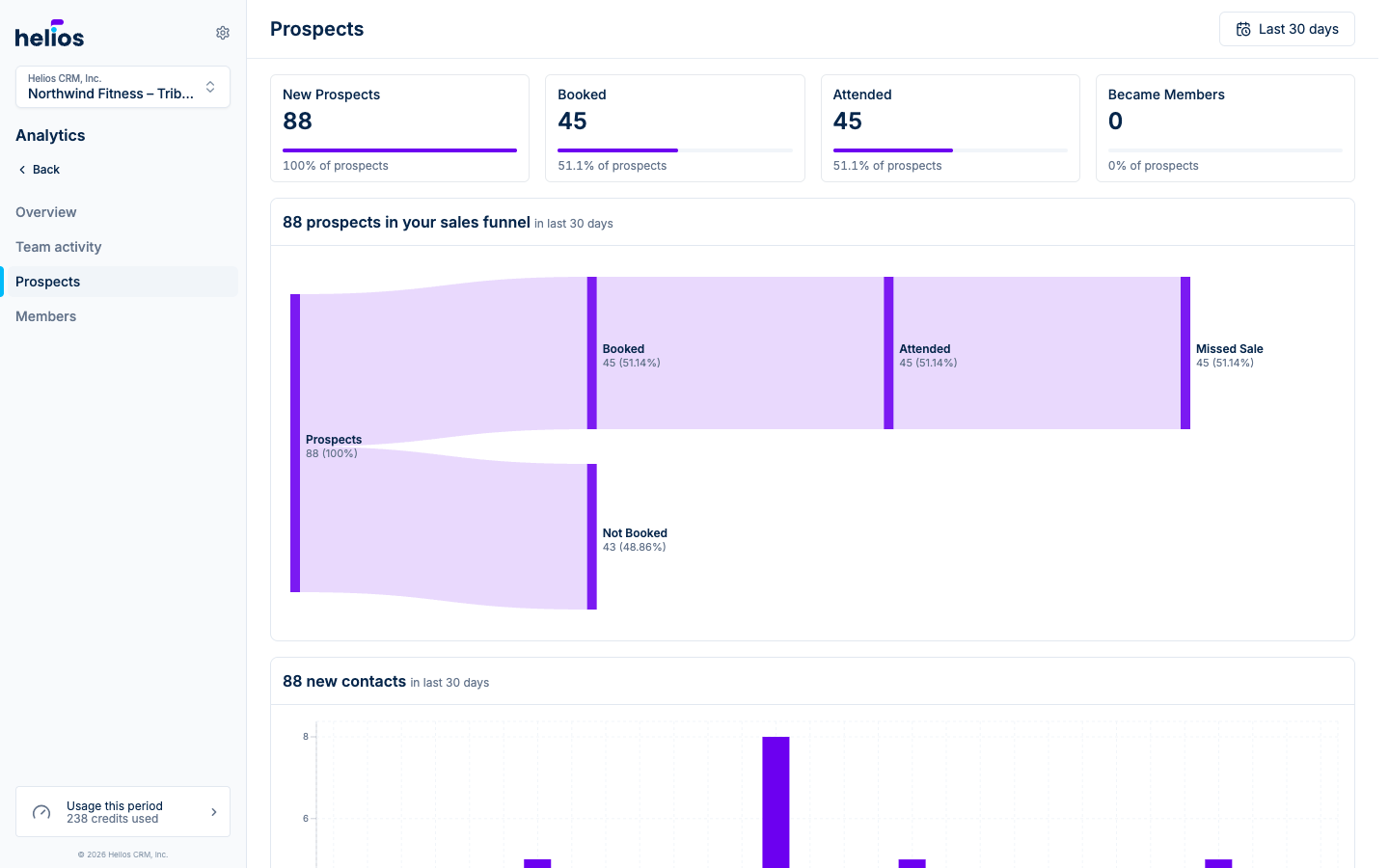
- Sales funnel: a flow diagram tracing every new prospect through booked, attended, and purchased, split by membership versus package purchases, so you can see exactly where leads drop off.
- Prospects report: new prospects, booking and attendance conversion, and membership conversion for any date range, with a new-contacts-over-time chart.
- Members report: a live snapshot of total and active members, a membership status breakdown, your top plans, and bookings versus attendance by day.
- Richer channel metrics: email opens and clicks, call outcomes and talk time, and MMS volume now feed the engagement views.
Everything is powered by the booking data your integrations already sync. Tour the reports in the analytics docs.
July 11, 2026
The integrations directory and detail pages got a full redesign, and each installed integration is now manageable in place.
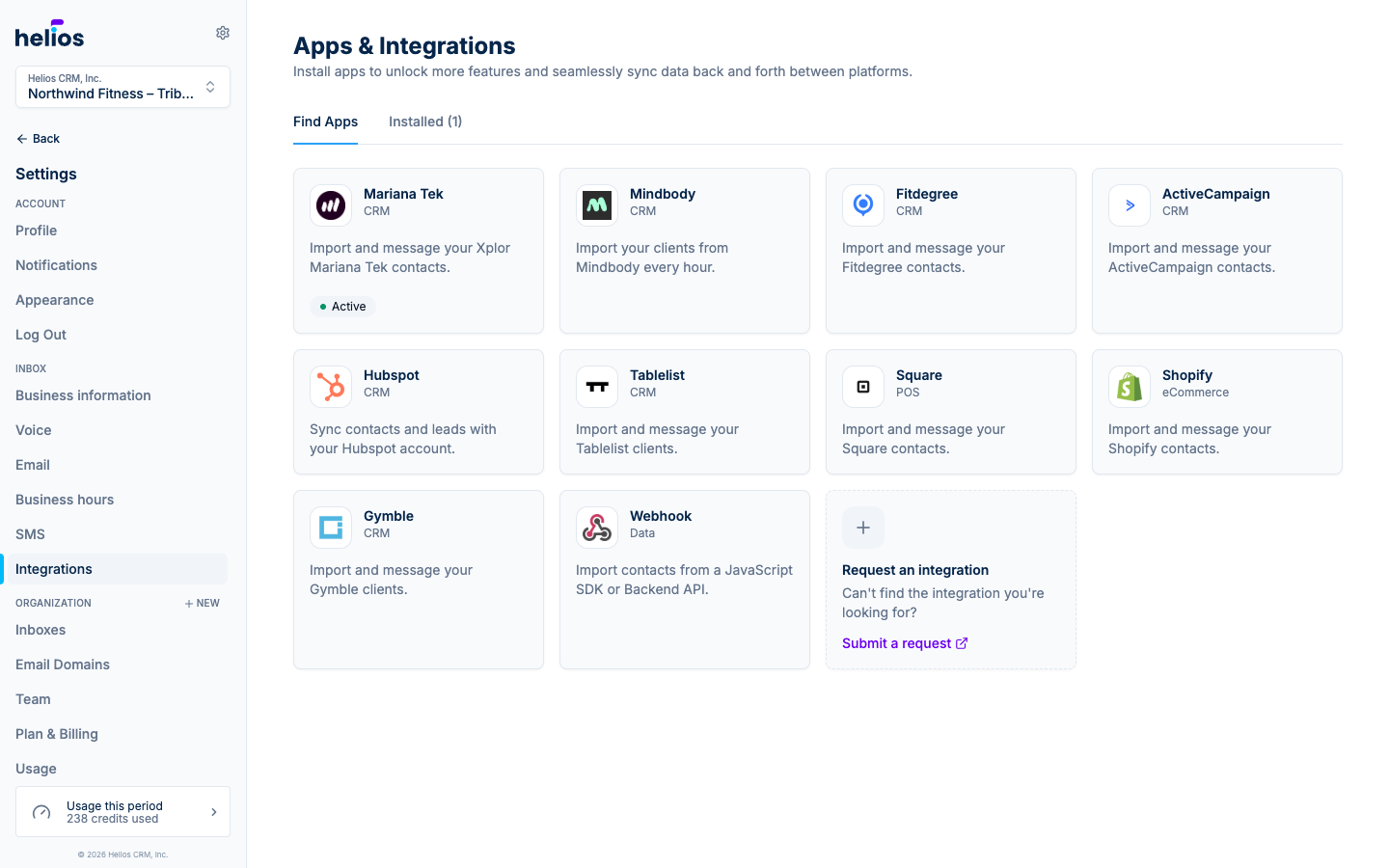
- New directory: a card grid of available and installed integrations with clear status badges and a “Request an integration” card if we’re missing your system.
- Per-integration pages: each integration now shows an Event stream of the customer activity it syncs, an Integration history of sync jobs, and a Settings tab with an active/paused toggle, connection details, and location management.
- Safer management: pausing, editing locations, and uninstalling all live behind clear confirmations instead of a modal maze.
Browse what’s available in the integrations docs.
July 11, 2026
Calling comes to the web app. The same Helios number that texts your customers can now ring your browser, no desk phone or separate softphone needed.
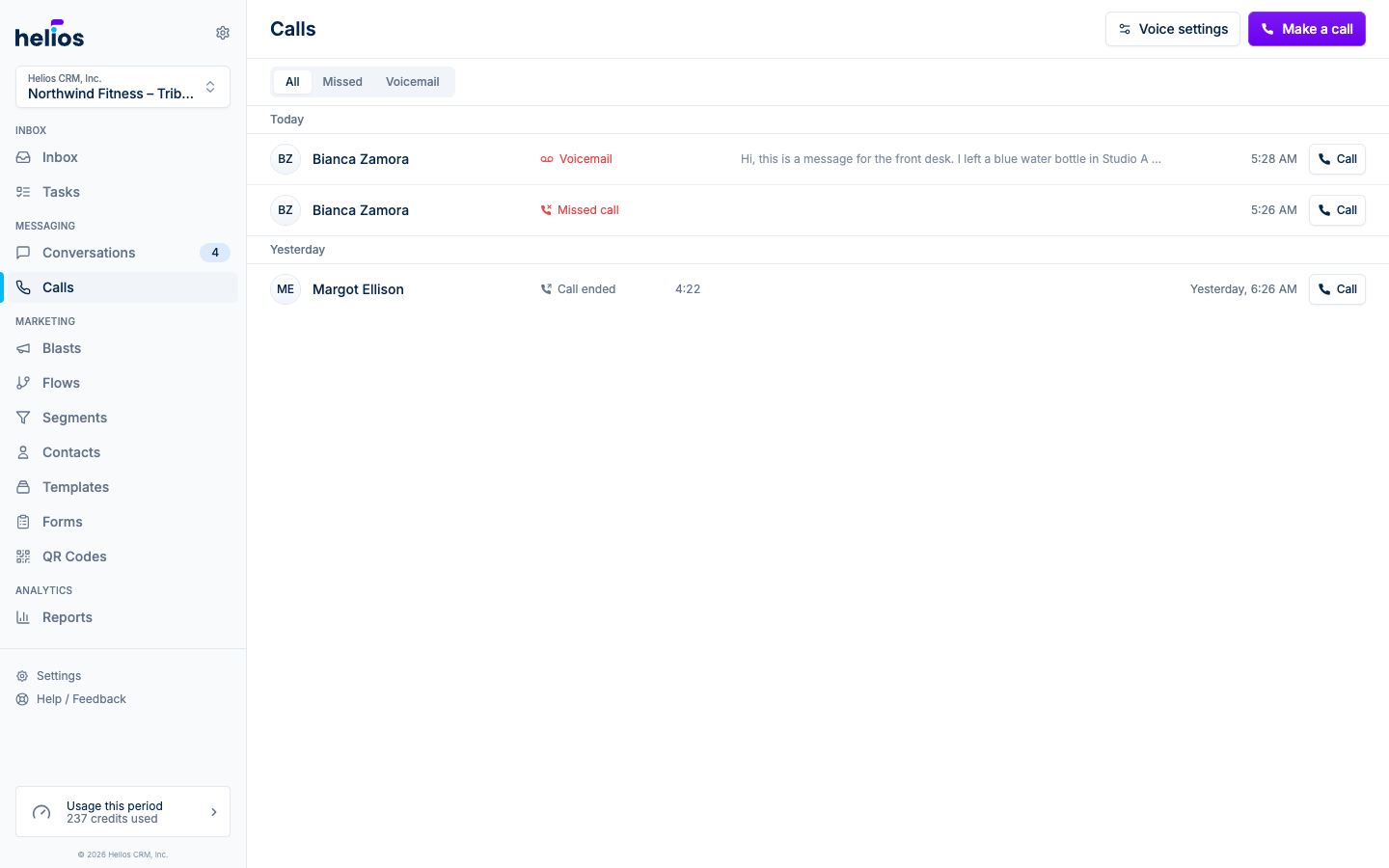
- Call from anywhere: the thread header, the contact sidebar, or the new dialer with contact search and a keypad. A confirmation always appears before dialing.
- A call widget that travels: the floating, draggable call card stays with you as you navigate, so you can pull up the customer’s history mid-call. Mute, keypad, and hang-up are always in reach.
- Incoming calls: teammates with ringing enabled see an incoming call card with the caller’s name and accept/decline. First to answer takes the call; ringing is a per-inbox personal setting.
- A proper Calls page: the call log groups calls by day with duration, outcome, and voicemail playback with transcripts, next to the conversation itself.
Set it up in the calls docs.
July 8, 2026
A wave of improvements across everywhere you write email in Helios.
- Open and click tracking: email blasts now report delivered, opened, and clicked, with per-recipient breakdowns on the blast detail page. Bounces and spam complaints are handled automatically so undeliverable addresses are skipped on future sends.
- Dark mode emails: emails built with default colors adapt to the recipient’s dark mode, and the builder gains a light/dark preview toggle so you can check both before sending.
- Social links in the footer: add your website, Facebook, Instagram, and X links once in inbox settings and they render as an icon row in every email footer.
- Send preview: every email surface (template builder, blasts, and flow email steps) can send a test copy to your own address, merge tags included.
- Email from the new message page: starting a conversation with a contact who has an email address now offers Send email right from the compose screen.
July 7, 2026
Flow messages can now pull live data from the contact and the event that triggered the flow, so “class booked” automations can say which class, when, and with whom.
- Insert field chips: drop contact and event fields into SMS bodies, email content, and subject lines as labeled chips with live example values.
- Formatting and fallbacks: click any chip to choose a format (dates, times, currency, numbers, capitalization) and a fallback value for contacts missing the field. Dates render in your inbox’s timezone.
- Wait until an event date: timers gain an “until” mode anchored to a date from the trigger, with an offset. Build steps like “send a reminder 1 hour before the class starts”.
See the flow docs for how triggers, actions, and timing fit together.
June 23, 2026
Segments can now match customers who fit any one of several rule groups, not just a single list of conditions.
Build groups of criteria where everything inside a group must match, then add alternatives with Add OR group. For example: (active members on an unlimited plan) OR (anyone who reserved five or more classes). Existing segments keep working exactly as before, and single-group segments look the same as they always have, now with an explicit AND connector between conditions.
Read more in the dynamic segments docs.
June 14, 2026
A big round of upgrades to the flow builder.
- Send email from a flow: a new email action with the full email composer, so automations can send designed emails, not just texts.
- First-class tags: add or remove contact tags as flow steps, and use tags in triggers and conditions, making it easy to chain flows and build audiences from automation behavior.
- Delivery windows: cap the hours a flow is allowed to send each day (with weekdays-only and apply-to-all-days shortcuts) so a 2 AM trigger becomes a 9 AM message.
- Per-step recipients: every action node on an active flow now shows who is currently at that step, with a drill-in panel for debugging why someone did or did not get a message.
See flow actions and logic and timing for the full picture.
June 8, 2026
Turn foot traffic into conversations. The new QR Codes page generates a scannable code that opens the visitor’s SMS app with your inbox number and a pre-filled message, so a poster at the front desk becomes a lead in your inbox.
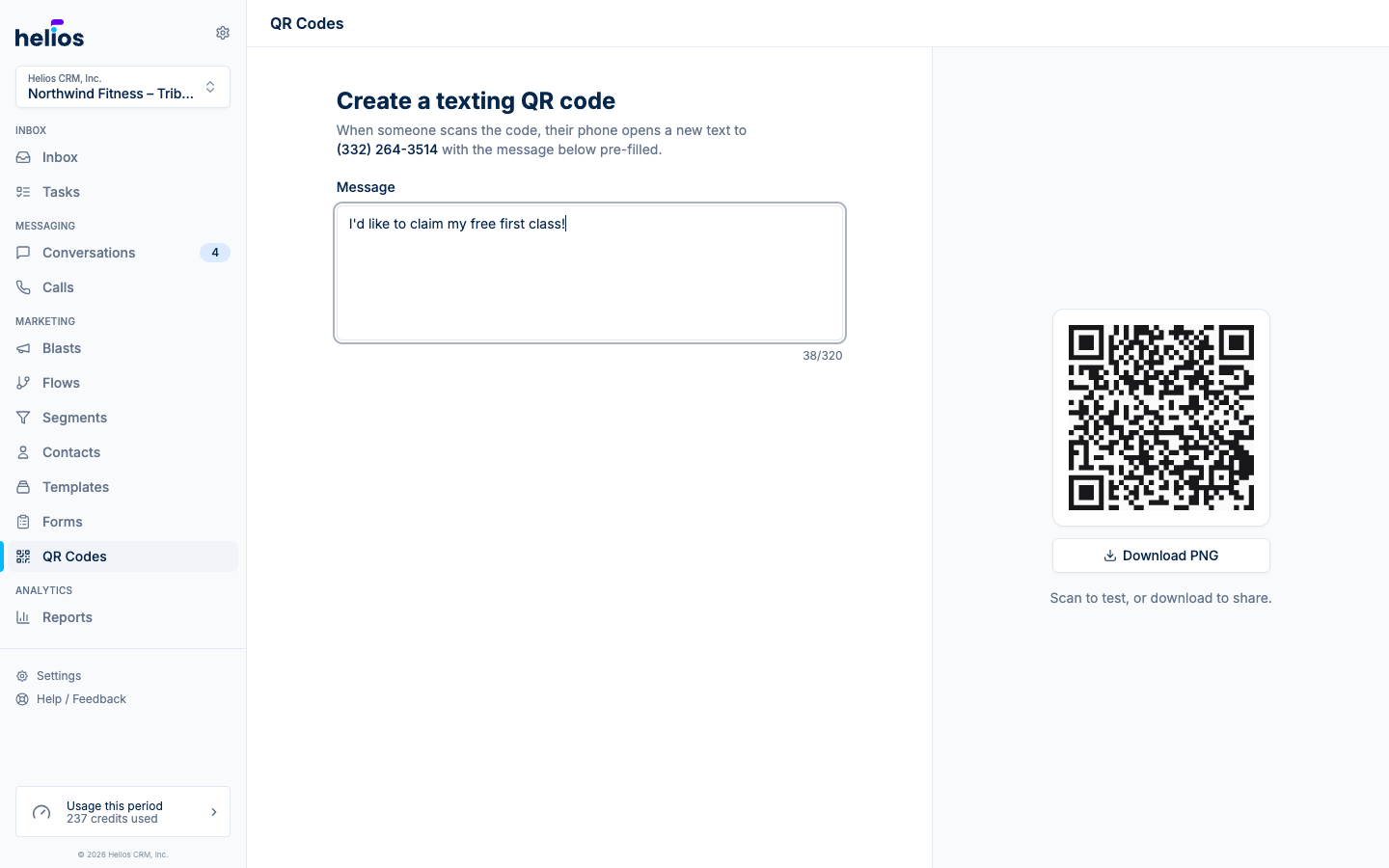
Type the message you want prospects to send, watch the code update live, and download it as a high-resolution PNG ready for print. Details in the QR codes docs.
May 31, 2026
Email joins texting in Helios. Design campaigns, send them to a list or segment, and manage replies in the same inbox as everything else.
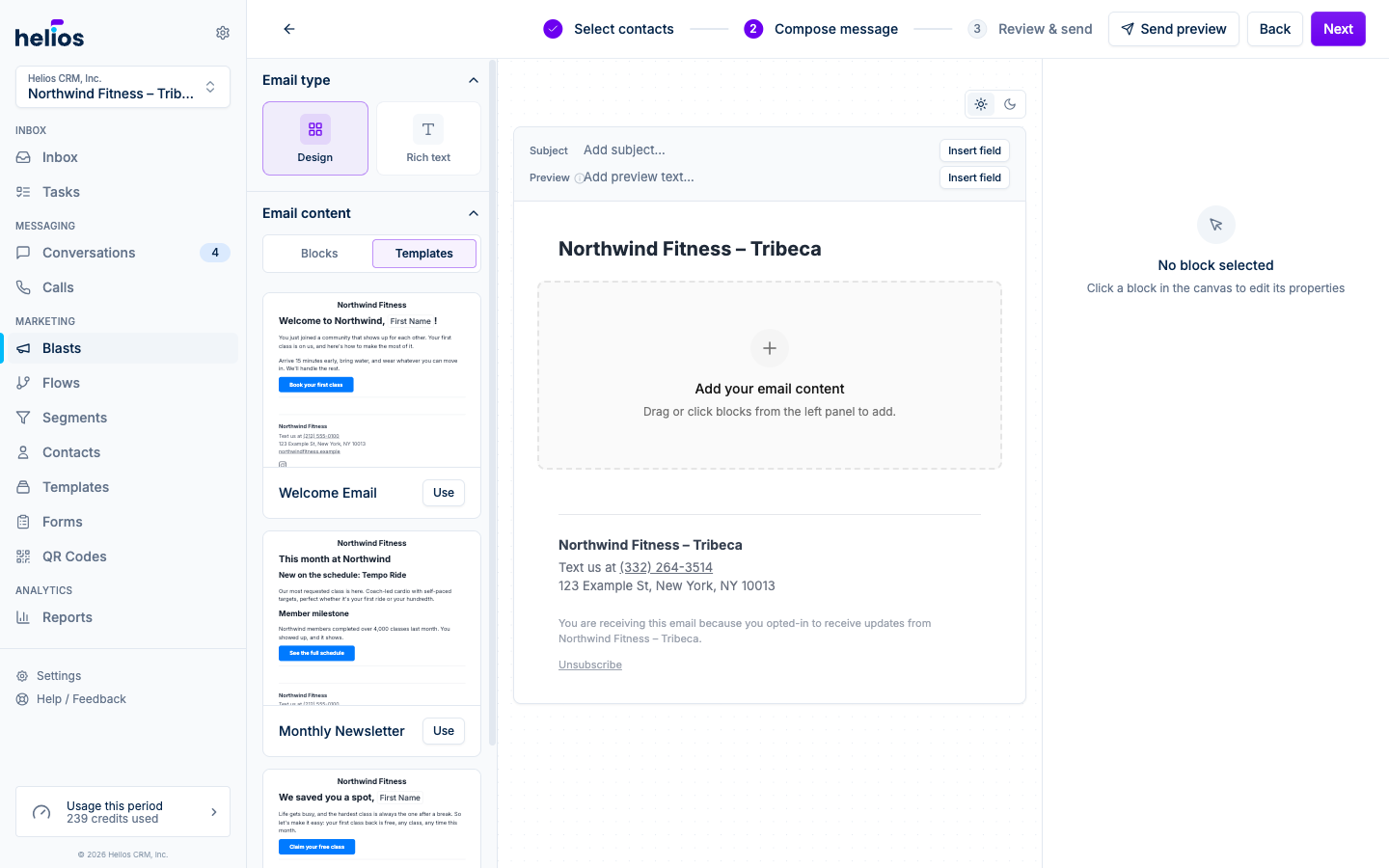
- Email blasts: the blast wizard now offers Email alongside Text message, with the same pick-audience, compose, review flow.
- Email template builder: a drag-and-drop builder with heading, text, button, image, divider, header, and footer blocks, plus a rich text mode for simple notes that read like a personal email. Save templates once and reuse them across blasts.
- Custom sending domains: verify your own domain under Settings, Email Domains so campaigns come from your address, with SPF and DKIM handled through a guided setup.
- Compliance built in: automatic unsubscribe links, one-click list-unsubscribe headers, and opt-out enforcement on every send.
Read the email blast docs and template builder docs to get started.
February 28, 2026
Helios on the web now has a full dark theme. Pick System, Light, or Dark under Settings, Appearance: System follows your operating system, and the other two lock Helios to the theme you prefer. Every page, from the inbox to the flow editor, has been tuned for both.
February 28, 2026
Your Helios number now handles calls, not just texts. Make and take calls from the iOS app, and see every call alongside the rest of the conversation.
- Calls tab on iPhone: a redesigned calls experience with a native-style dialer, contact search, grouped call history, missed-call badges, and one-tap callback.
- Every call lands in the thread: answered, missed, and outgoing calls all appear in the conversation timeline with their outcome and duration, so the customer history stays complete across texts and calls.
- Voicemail with transcription: missed callers hear your greeting and can leave a voicemail; Helios transcribes it automatically so you can read it like a message.
- Call log on web: review calls and voicemails from the web app too.
See the calls docs to get set up.
February 15, 2026
See your inbox without opening the app. The new Helios Inbox widget puts unread messages, new leads, and assigned threads on your home screen.
- Four sizes: a small at-a-glance counter, a medium view with your latest unread threads and a Compose shortcut, a large view with full stats and inline mark-as-read, and a lock screen widget you can check without unlocking.
- Tap to jump in: tapping a thread opens that conversation; tapping the stats opens your Inbox tab.
- Deep links: the app now registers the
sendhelios://URL scheme, so Shortcuts and other tools can open the inbox, the composer, or a specific thread directly.
Add it from your home screen: long-press, Edit, Add Widget, then search for Helios. Details in the widget docs.
February 11, 2026
Email, meet your inbox. Send, receive, and manage emails right alongside your text conversations, all in one place.
- Email in conversations: emails appear inline with your text threads, marked with an envelope icon. Tap to open the full thread, organized by subject with sender details, timestamps, and attachments.
- Email composer: a full-screen composer with To, Subject, and a rich text body. Bold, italic, underline, and strikethrough formatting, plus up to 10 photo or document attachments per email.
- Email thread view: a card-based reader that groups messages by subject into collapsible threads. Reply, Reply All, and Forward from the most recent message, or long-press older messages for the same options.
- Conversation filters: filter by channel (Text, Email, or All), read state, and assignment from a new filter menu. Active filters appear as chips below search.
- Smarter previews: image-only emails show “Photo” or “2 Photos” in your lists, subject-less emails display “(No Subject)”, and task cards show attachment icons instead of blank text.
- Media: select up to 10 photos at once, with automatic compression per channel. Long-press any image or document for a full-screen preview gallery.
- Failed messages now display the specific error reason, plus general stability and performance improvements.
February 5, 2026
fitDEGREE studios can now run their messaging through Helios. Connect with your fitDEGREE API key, choose which FitSpots (locations) sync to each inbox, and your clients import automatically and stay current.
- Clients, registrations, and sales: class and event registrations (including class passes), completed and refunded sales, consumable usage, and intro offer purchases all sync in real time.
- Automation-ready events: build flow triggers and segment rules on any synced event, like a welcome flow that fires when someone purchases an intro offer.
- Conversion tracking: sales that happen after a Helios message are attributed to the campaign in your reports.
Setup and details in the fitDEGREE docs.
October 7, 2025
Spotted a typo right after hitting send? You can now stop a blast while it’s processing. Open the blast and click Cancel Message: remaining sends stop immediately, and the metrics show exactly how many messages went out before the cancel.
Messages already delivered can’t be recalled, but catching a mistake at 5% sent beats watching it reach the whole list. Details in the scheduling docs.
July 24, 2025
Helios now supports Australian businesses. Get an Australian phone number for your inbox, message customers on +61 numbers with proper local formatting, and pay Australian SMS rates with region-aware pricing and usage tracking.
Everything else works exactly as it does in the US: the inbox, blasts, flows, and integrations all speak Australian out of the box.
June 30, 2025
Gymble joins the integration lineup. Connect your Gymble account with an API key and your entire client base syncs into Helios: a full import on install, then new leads and customers in real time as they sign up.
Booking activity syncs too, unlocking Customer event flow triggers and segment rules on Gymble bookings. Setup takes about a minute; see the Gymble docs.
March 3, 2025
Starting from a blank page is the hardest part of marketing automation, so Helios now ships with prebuilt building blocks managed for you.
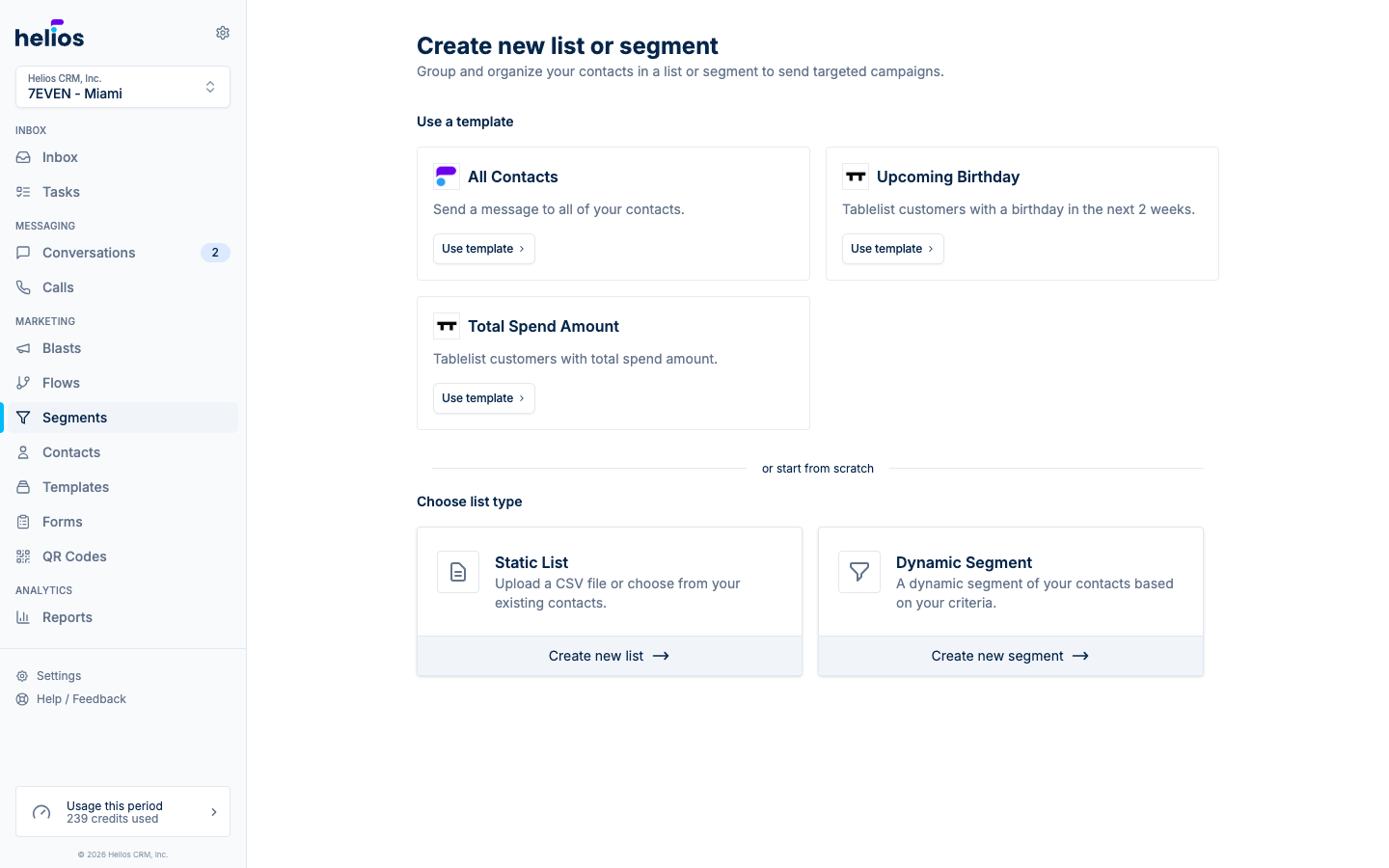
- Segment templates: one-click audiences powered by your integration data, like “Recent first visit”, “Took first class but haven’t returned”, and “Memberships ending soon”.
- Message templates: ready-to-send copy for the most common gym and studio moments.
- System flows: proven automations that Helios maintains and improves over time, protected from accidental edits.
Everything prebuilt is a starting point, not a lock-in: apply one and customize it in the normal editor. Browse what’s available in the segment templates docs.
February 28, 2025
Helios integrations now sync more than contact info. Memberships and orders flow in from Mariana Tek, giving every contact a real commercial profile inside Helios.
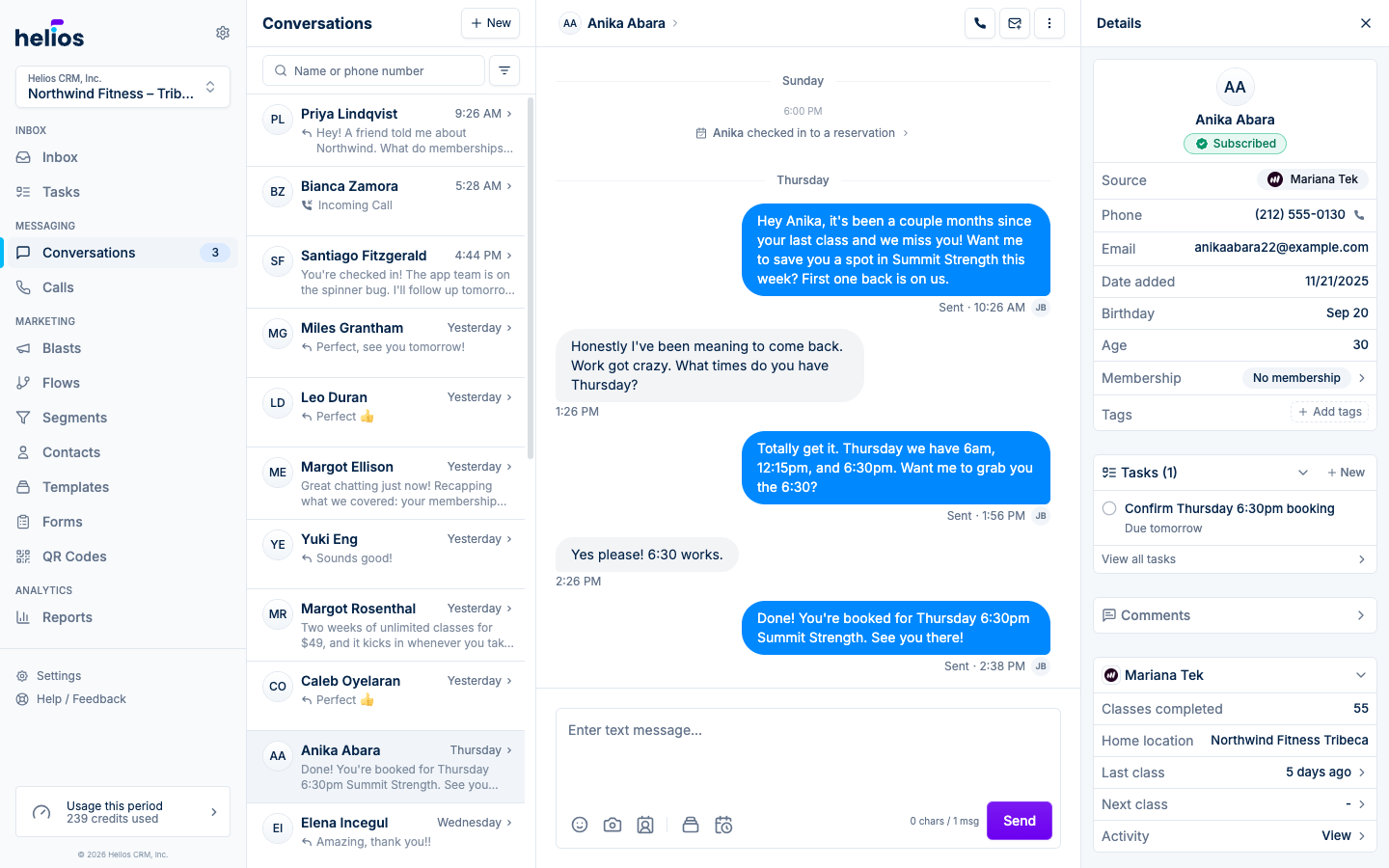
- Membership status on every contact: activations and deactivations sync automatically, so you always know who is an active member and on which plan.
- Purchase history: orders sync as they happen.
- Smarter segments: build audiences on this data, like “active members without autopay” or “churned members”, and pair them with campaigns and flows.
See the Mariana Tek docs for everything that syncs.
January 24, 2025
Customers text at 10 PM; your team does not. Each inbox can now define weekly working hours, and messages that arrive outside them get an automatic reply you write yourself, something like “Thanks for reaching out! We’re closed for the night and will get back to you in the morning.”
Set the schedule per day in your inbox settings, write the after-hours message once, and Helios handles the rest. The conversation stays marked unread so nothing slips through when the team is back. Configure it under inbox settings.
January 9, 2025
The biggest Helios release yet. Campaigns (today known as blasts) let you write one message and send it to an entire list, with real delivery data instead of guesswork.
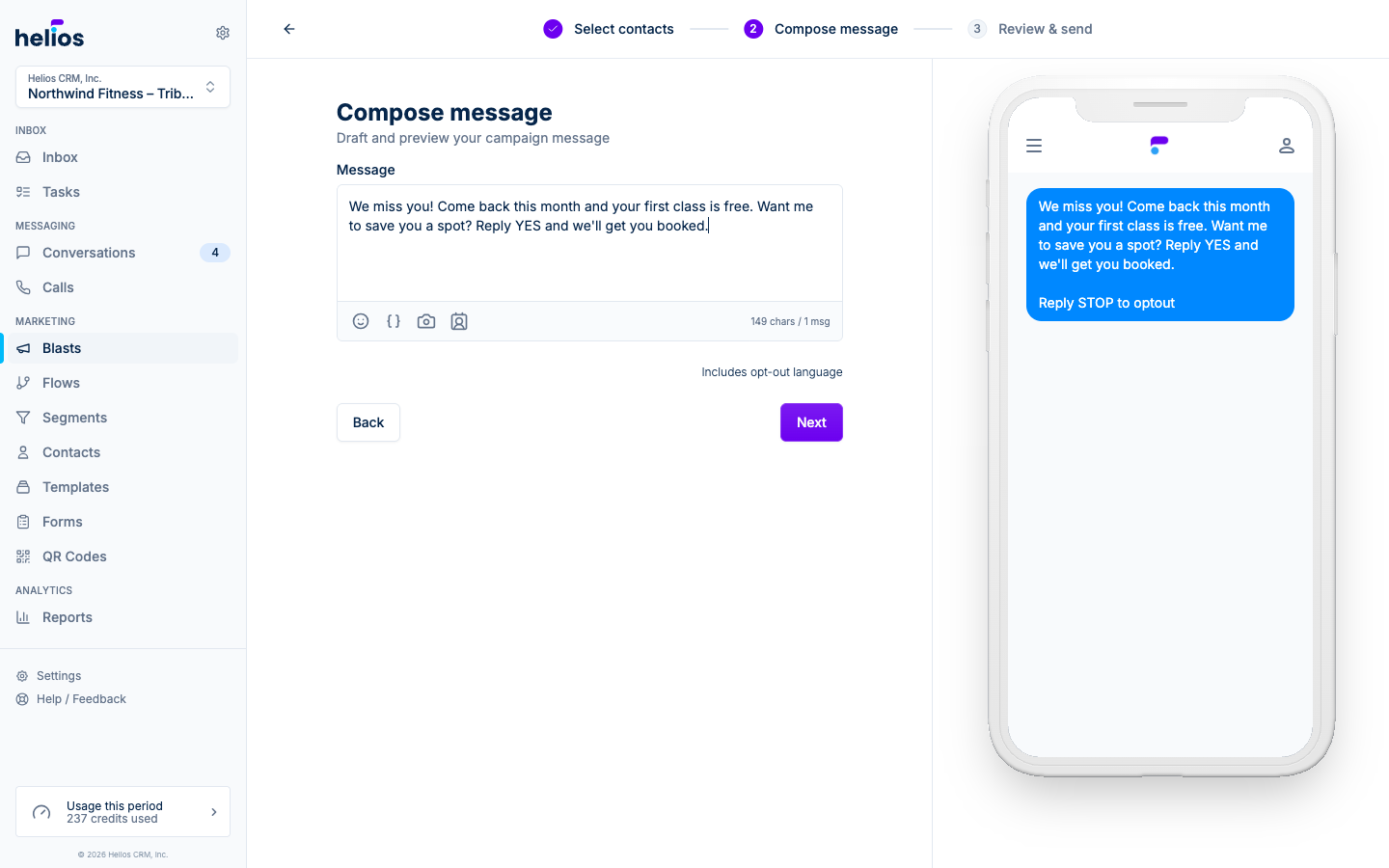
- Pick an audience, compose, send: choose a list, write your message with personalization variables, then send now or schedule for later.
- Live metrics: every campaign page tracks queued, delivered, and failed sends as they happen, plus replies and opt-outs.
- Trackable links: links in your message are tracked automatically, so the campaign page shows how many recipients actually clicked through.
- Per-recipient detail: a full recipients view shows exactly who got the message and what happened to each send.
This launch is the foundation for everything blast-related that followed. See the blast docs for the current experience.