Managing contacts
The contacts list, contact profiles, tags, and lists.
Every person you message lives in Contacts, created automatically from incoming texts and calls, form submissions, imports, and your integrations. The page shows the total count and a searchable table.
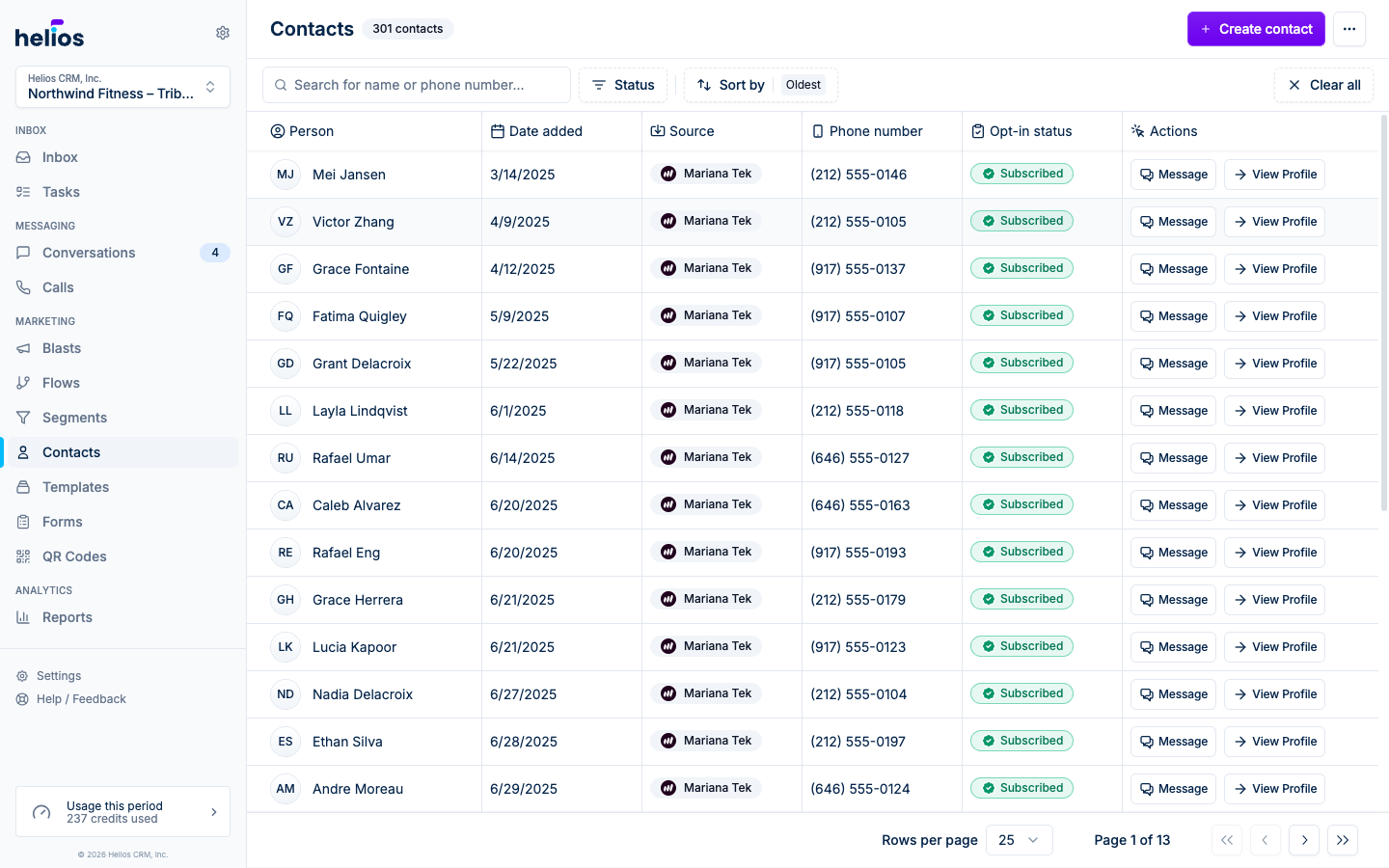
Each row shows the Person, Date added, Source (where the contact came from: an integration, paid ads, an incoming call, a CSV), Phone number, Email, and Opt-in status (Subscribed or Unsubscribed). Row actions jump straight to Message or View Profile.
Filter by Status (Subscribed / Unsubscribed), sort by Newest / Oldest, or search by name or phone number.
Create a contact
Click Create contact and fill in First name, Last name, and a Phone number or Email address (at least one is required; you can add the other later). Most contacts you won’t create by hand (they arrive via imports, forms, and integrations), but it’s there when someone hands you a business card.
The contact profile
Open any contact to see everything about them in one place. The left panel is the same contact sidebar you see next to a conversation in the Inbox; the right side holds tabs for the work you do with that person.
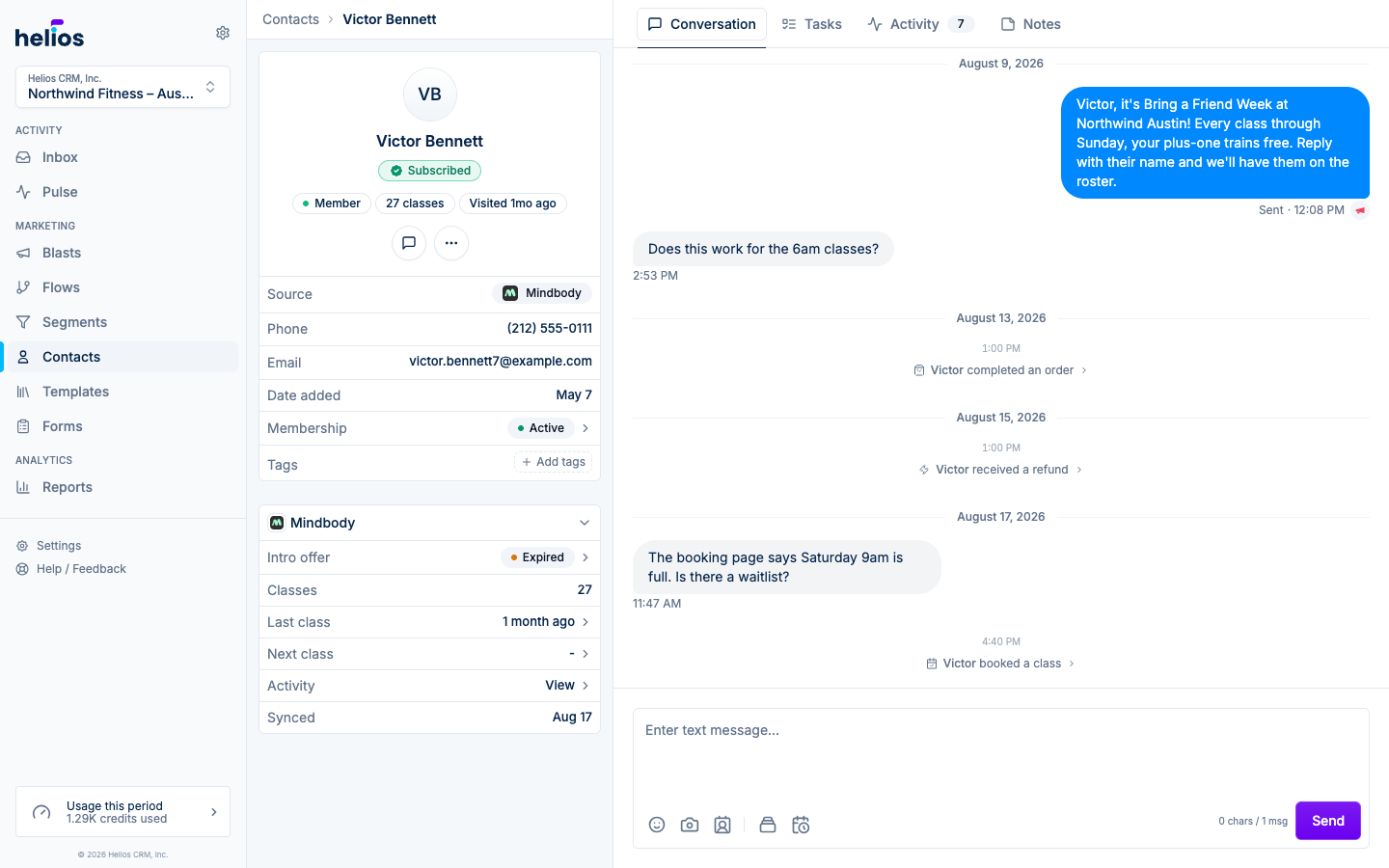
The details panel on the left shows:
- Name, subscription badge, and a row of at-a-glance chips: where they are in your funnel (Lead, Intro offer, Member), how many classes they’ve taken, when they last visited, and how you can reach them.
- The key insight card when Helios has one for the contact.
- Source, phone, email, date added, membership, and Tags (freeform labels, editable inline: type a tag and press Enter). Tags are usable as segment criteria and settable from flows.
The tabs on the right:
- Overview: where the profile opens. The summary card leads with membership status in plain words (Active member, Frozen membership, Former member, or No membership), with the plan name underneath and the renewal or end date beside it. Their funnel stage and VIP status sit just below. Two tiles show the last visit and the next booking with the date, class or service, and time; a dashed Nothing booked tile means nothing is on the calendar. Short labeled lines follow: Balance (credits left and an active or recently expired intro offer), History (completed classes), and Heads up (no-shows and late cancels). Click the membership, an underlined value, or a visit tile to open its details. The Class visit history card shows the last 12 months with one square per day. A single visit is the lightest shade, and every day in a run of consecutive visits gets darker the longer the streak (2 to 3 days, 4 to 6, 7 or more), so habits stand out as dark blocks. The header sums the classes, how often they come (about 2 per week), and their longest streak in view. Hover a square for each class’s time, name, whether it was checked in or only booked, and which day of a streak it was, and use the year buttons to look back at any year on record. Below it, Notes gives you a quick composer and shows the total note count beside the All notes link. The Visit log button drops in prompts for who they came with, what they said, what the coach observed, and whether they bought. For Zenoti guests, the same card shows their Zenoti membership, the last visit and next appointment with the service, Balance (membership credits and open packages with sessions left), History (visits and lifetime spend), Preferences (preferred therapist and top service), and no-shows. Click a visit tile to open that appointment’s details, the membership or packages to open theirs, or visits and spend to jump to the Activity tab. Their Visit history card works like the class card, with one square per day they checked in to an appointment (or booked one with no outcome recorded) and the service name in each day’s tooltip.
- Notes: internal notes about the contact, visible to your team and never sent to the contact. Notes read like a conversation, oldest to newest with the latest at the bottom, and the composer sits underneath. Write your note and click Post. The toolbar covers bold, italic, links, lists, quotes, and emoji, and shortcuts like
**bold**and-for a bullet work too. URLs become links automatically. Hover a note you wrote to edit it in place or delete it; edited notes show an Edited marker. - Tasks: open tasks for this contact, with a Done filter and a New task button that pre-fills the contact.
- Conversation: the contact’s text thread, with the same timeline and composer as the Inbox. Studio events (bookings, no-shows, purchases) appear inline between messages. If there is no thread yet, send the first text from here to start one.
- Activity: the same Upcoming, History, and Spend lists the contact sidebar shows in the Inbox, with room to read them. Click a visit or order to open its details in a pane beside the tabs on wide screens or a sheet when space is limited. Zenoti guests see their appointments here, and Spend splits lifetime spend across memberships, services, and packages. Contacts without a connected booking system show their event timeline (form submissions, page visits) here instead.
The address bar follows the selected tab, Activity or Tasks filter, and any open detail. Your browser’s Back and Forward buttons step through those selections.
Under the contact’s name, icon buttons cover the day-to-day: Message, Email (when email is enabled), Call (when calling is set up), and a More menu with Add to list and the editing actions below. On phones and tablets, the details panel becomes a Details tab alongside the others.
Add to list
Add to list puts the contact on one or more static lists. Dynamic segments aren’t in this menu; membership there is computed from rules, not assigned.
Editing, opting out, blocking, deleting
The profile’s overflow menu holds the rest:
- Edit: update name, phone, email. If the contact came from an integration, a warning notes that Helios edits won’t sync back and may be overwritten by the integration.
- Opt out / Opt in: manually toggle SMS subscription. See Opt-outs and compliance.
- Block / Unblock: stop all messaging with this contact in both directions.
- Delete: permanently removes the contact. This cannot be undone.