Logic and timing
Waits, filters, if/else branches, and delivery windows.
Actions do the work; logic and timing decide who continues and when. These blocks live in the Time and Logic sections of the palette.
Wait
Pauses the contact before the next step. The default is 1 day; set any amount of Days, Hours, Minutes, or Seconds.
Flows with dynamic fields enabled get a second Wait type:
- Wait for a period of time: the standard relative wait.
- Wait until a specific date: waits relative to a date on the contact or event: pick the Event date and an Offset (amount, unit, and before/after). This powers “3 days before their membership expires” or “1 hour before their class starts” style timing.
The Event date list pulls date fields from the event that triggered the flow, so each contact waits relative to their own event. For a “Booked a class” trigger that includes Class start date/time: pick it with an offset of 1 Hours before and every contact gets their step exactly one hour before the class they booked.
A classic follow-up sequence is just messages separated by waits:
Trigger: Added to list "New leads"
→ Send text (welcome)
→ Wait 2 days
→ Send text (offer)
→ Wait 5 days
→ Send email (last chance)
Filter
A gate. Add criteria (the same builder as dynamic segments) and only contacts who match continue past this step; everyone else stops there. Use it to narrow after a broad trigger, e.g. Form submission → filter Location equals Westwood → location-specific reply.
Conditional (if / else)
A fork. Contacts matching the criteria take the Yes branch; everyone else takes No. Each branch continues with its own steps, so both audiences get handled. Unlike a filter, nobody is dropped. The node summary reads If / else with the rule count.
Conditionals nest: put another conditional inside a branch for more granular routing.
Checking the event that started the flow
Filters and conditionals evaluate when the contact reaches the step, not when the flow starts. That matters after a wait: a lot can change between “booked a class” and “class starts in an hour.”
When the flow’s trigger is a booking event, the Add criteria menu leads with a Trigger event category:
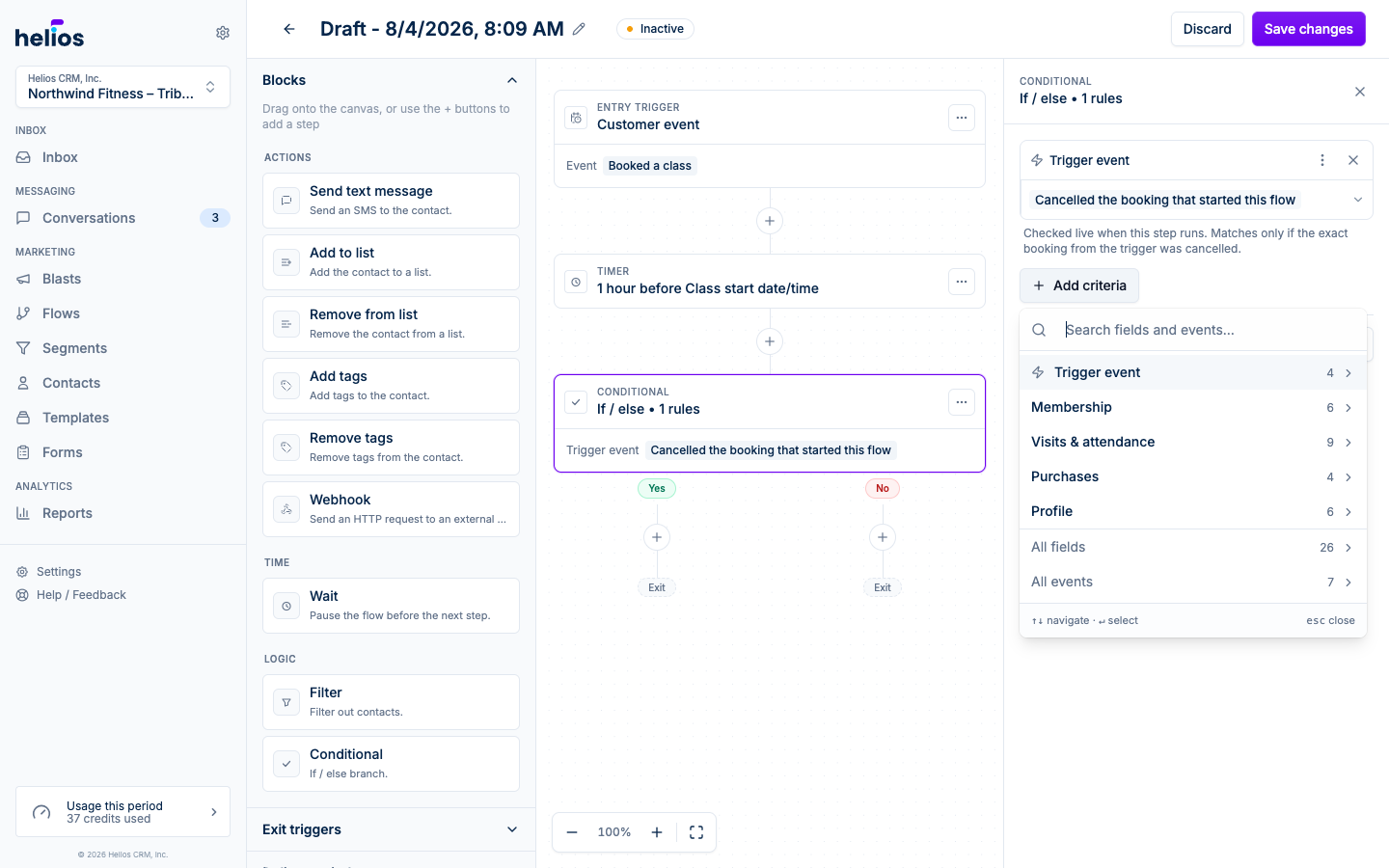
- Cancelled the booking that started this flow: matches only if the exact booking from the trigger was cancelled. Cancelling a different class does not count.
- Still booked (hasn’t cancelled): the inverse, for filters that should only let active bookings through.
- Checked in to the class: matches once attendance is recorded for that booking. Use after the class start time, for thank-you or feedback follow-ups.
- Missed the class (no-show): matches once the booking is marked a no-show. Use after the class start time, for win-back nudges.
- Late-cancelled the booking: matches if the booking was cancelled after the cancellation window (FitDEGREE only).
The exact checks depend on what your booking platform reports. Adding one places a Trigger event chip on the step. Click the chip’s value to switch between the available checks, or remove it like any other criterion. All are checked live when the step runs. A pre-class reminder flow uses them like this:
Trigger: Booked a class
→ Wait until 1 hour before Class start date/time
→ Conditional: Cancelled the booking that started this flow
   Yes → (stop, or send a rebook nudge)
   No  → Send text (see you soon!)
For other criteria, event conditions can also reference trigger event fields directly: open a condition’s value and use the braces button to switch from a typed value to a field from the trigger event. Available for FitDEGREE and Mariana Tek booking events.
Delivery windows
The editor’s Delivery window panel constrains when messages go out, regardless of when a contact reaches a send step:
- Toggle Limit delivery hours.
- Set allowed hours per day, Monday through Sunday. Apply to all days and Weekdays only fill the schedule quickly.
- Save delivery window.
If a contact hits a send step at 2 AM, the message waits until the window opens, and the contact stays on that step until it goes out. Any wait that follows starts counting from when the message is actually sent, so “send, wait 1 day, send” keeps a full day between the two messages even when the first one was held for the window.
Exit triggers
Covered in Triggers, but they’re part of your logic toolkit too: an exit trigger like Customer event: purchase turns any nurture flow into “message until they buy, then stop.”