The contact sidebar
Full customer context beside every conversation, so anyone can reply personally.
The contact sidebar sits beside every open conversation and answers the question “who am I talking to?” without leaving the thread. Anyone on the team can open a conversation cold and reply like they know the person.
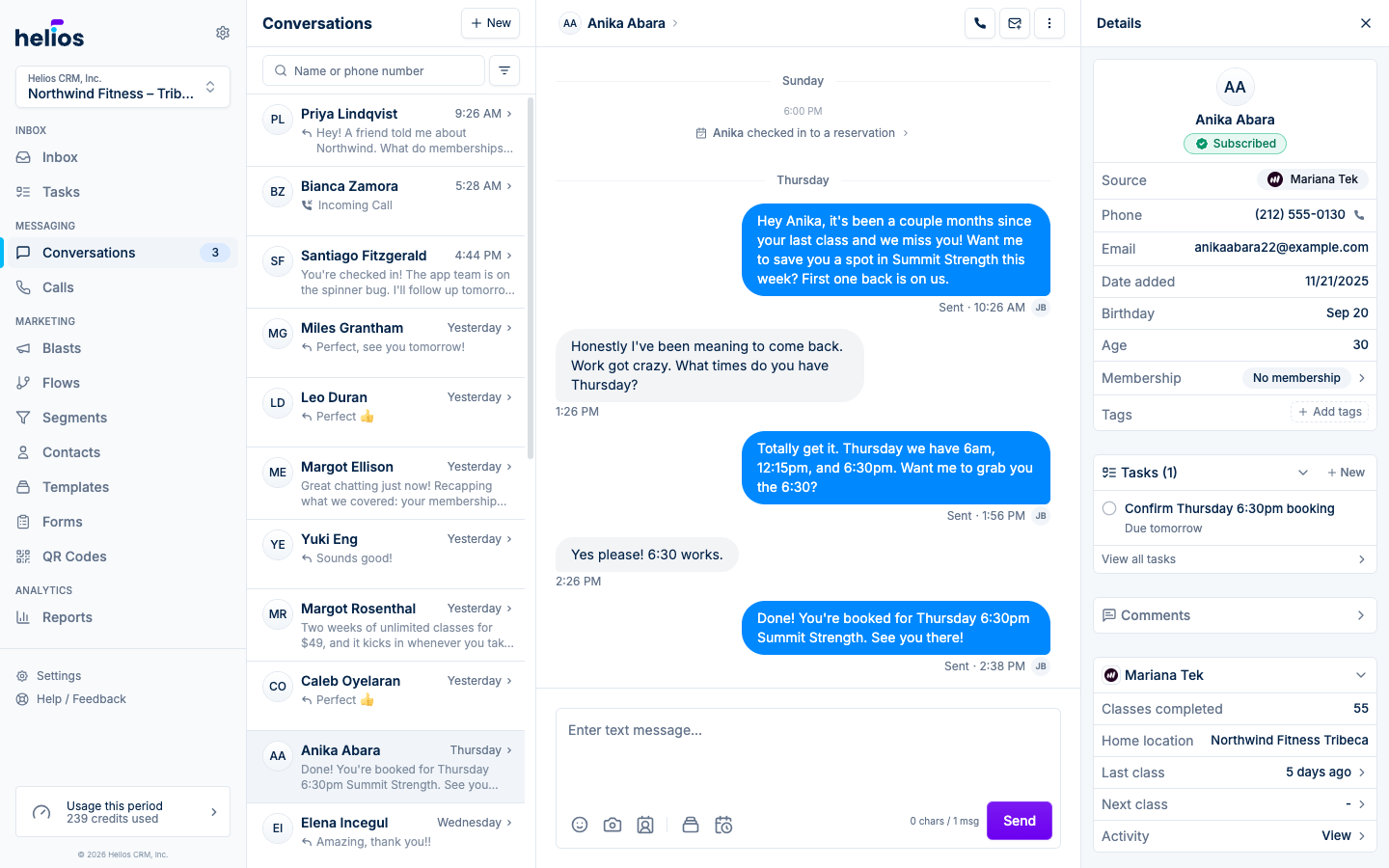
Three tabs at the top of the sidebar split it up: Details (everything below, from the key insight to booking-system data), Notes (your team’s notes about the contact), and Tasks (the contact’s open and completed tasks). Opening a membership, reservation, or task from any tab shows a breadcrumb in its place; click the first crumb to return to the tab you were on.
Key insight
At the top of the sidebar, a Key insight card surfaces the one thing worth knowing about this customer before you reply: an intro offer about to expire, a recent no-show, a class milestone, a question they asked in their last message. Helios generates it from the customer’s profile, activity, and conversation, and keeps it current as new messages and events come in.
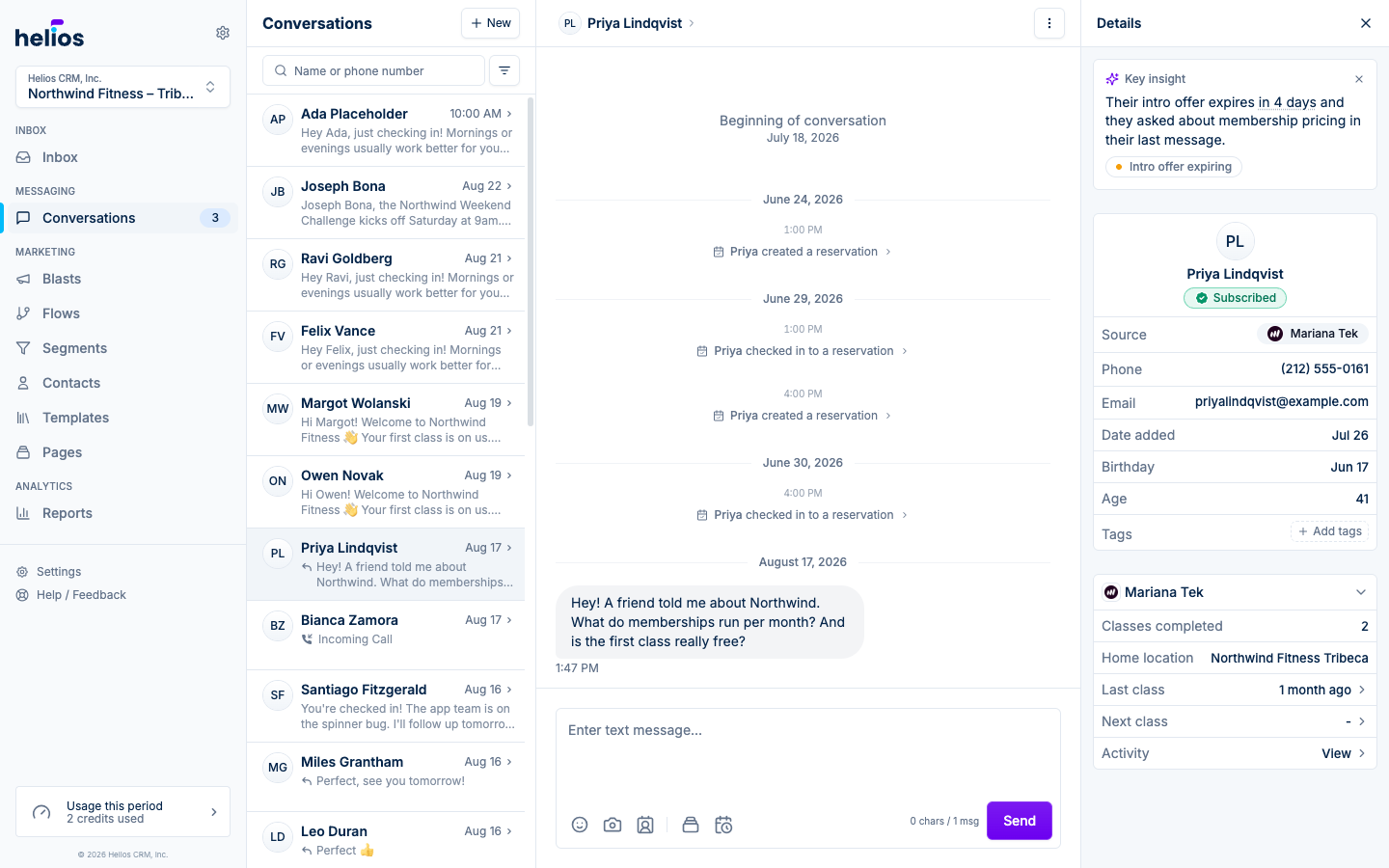
Dates in the insight always show relative to now (“in 4 days”); hover one to see the exact date. If an insight isn’t useful, dismiss it with the X. It stays hidden until something new changes the picture, and dismissals teach us which insights matter to your team.
The card also appears on the contact page, so the context is there even before a conversation starts.
The profile card
The top card shows the essentials:
- Name (click through to the full contact page) and opt-out status
- Source: where the contact came from, whether an integration, a form, an import, or the API
- Phone and Email, both copyable, with a call button on the phone row
- Date added, plus extras like birthday, employer, and notes when known
- Tags on the contact
Membership and visit context
When a contact is synced from a connected system, the sidebar shows sections for that integration’s data. Depending on the integration, that includes:
- Membership status, with a drill-down into the full membership detail
- Classes completed, last class, and next class
- Home location
- Visits, lifetime spend, and average spend, with upcoming reservations
- Intro offers, passes, and owned items
- A recent activity feed
- For Zenoti guests: visits, lifetime spend, and upcoming appointments; their membership and open packages; last visit, next appointment, preferred therapist, and top service. Click any of them to drill in:
- Membership shows the status, billing type, renewal or end date with price, credits left, start date, and total paid.
- Packages lists each open package with sessions left out of the total, the expiry date, and the start date.
- Visits, last visit, next appointment, and activity open Upcoming and History tabs of appointments. Click an appointment to see its services, add-ons, therapists, time, price, and whether they attended, cancelled, or did not show.
- Lifetime spend opens a Spend tab that splits spend across memberships, services, and packages and lists paid purchases.
This is what makes replies personal: the person answering can reference the customer’s actual history (their 615th class, their upcoming Saturday reservation) without opening another system.
Activity from the conversation
Tapping an activity marker in the thread (a class reservation, a form submission, a page view) opens that event in the sidebar. Form submissions show the answers the person gave. Page and form events show the page or form name, what they clicked, and the campaign source when Helios has it. Click the page name to open that page.
Notes
The Notes tab holds the team’s notes about the contact, laid out like a conversation and shared with the Notes tab on the contact page: the same notes appear in both places. Type in the composer at the bottom and press Post (or Cmd/Ctrl+Enter). Notes support formatting, links, and emoji, you can edit or delete your own, and they are never shown to the customer.
Tasks
The Tasks tab lists the contact’s open tasks with a Done toggle for completed ones and a New button that creates a task pre-linked to the contact, so “call them back Thursday” gets captured the moment you think of it, without leaving the thread. Click a task to open it in the sidebar.
Flows
If the contact is currently in one or more flows, a Flows section lists each one with its next action, and lets you remove the contact from a flow directly from the sidebar.
See also
- Managing contacts for the full contact page and editing
- Integrations for connecting the systems that feed this context