Triggers
Every way a contact can enter (or exit) a flow.
A flow starts with an entry trigger: the event that pulls a contact in. On a new flow the canvas prompts Add an entry trigger: “Choose what causes contacts to enter this flow.” Click Choose trigger and pick one.
Triggers are grouped by source: Helios triggers are always available, and connected integrations add their own (for example Mariana Tek).
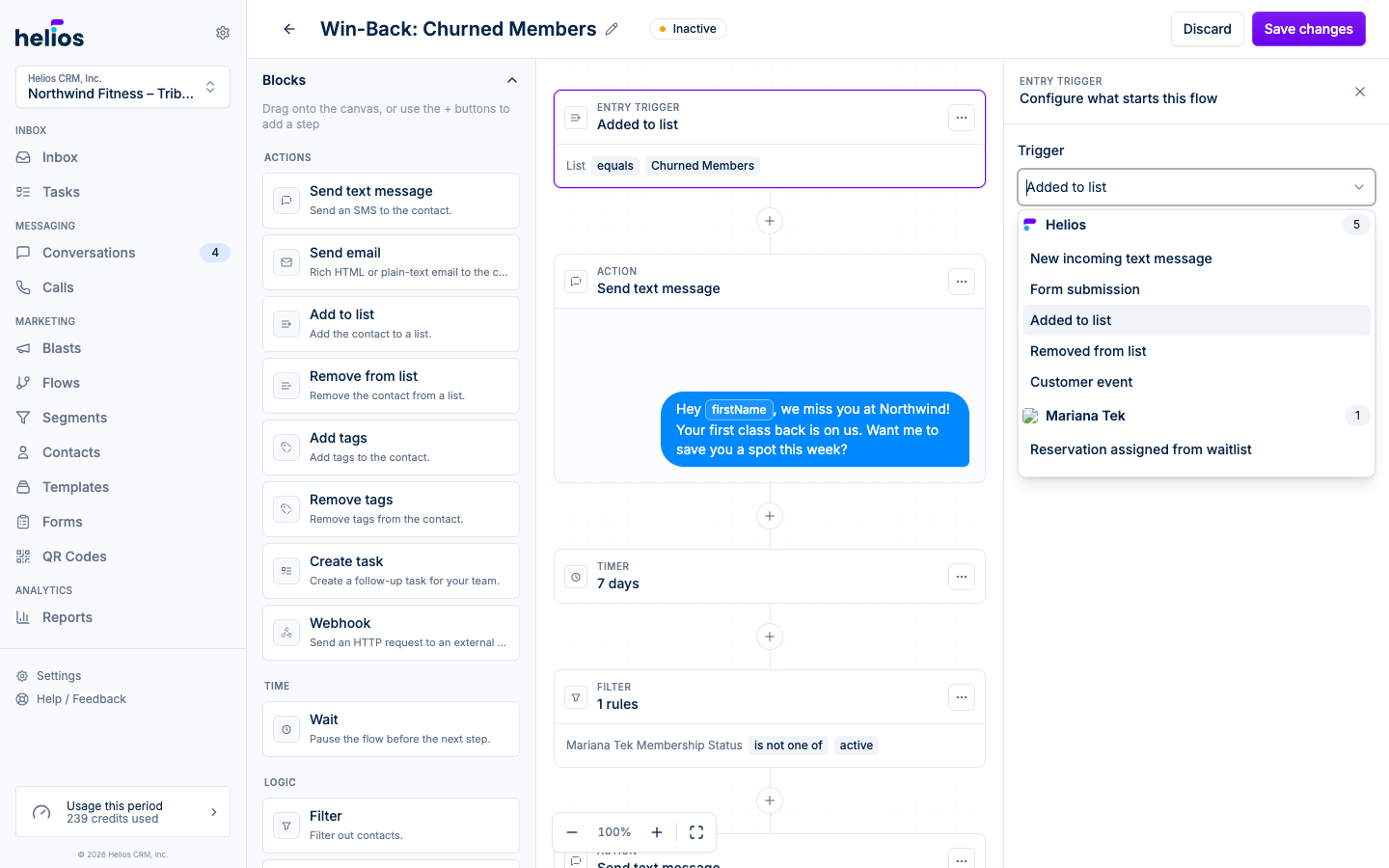
Helios triggers
New incoming text message
Fires when a contact texts you. Configure the Match type:
- Any message: fires on every incoming text, regardless of what it says. Use it to catch all inbound replies (for example, to auto-respond or tag anyone who texts back).
- Contains any: fires if the message contains any of the Keywords you list. Good for campaigns like “text JOIN to sign up”.
- Exact match: fires only when the message is exactly the Keyword.
This is the trigger behind keyword campaigns: put the keyword on a poster or QR code, and the flow handles the reply, list add, and follow-up automatically.
Form submission
Fires every time someone submits one of your forms. Runs for every submission; pair it with a filter if you only want certain submissions to continue.
Added to list
Fires when a contact is added to the list you choose, whether by hand, by import, by a form, or by another flow. This is the usual entry point for welcome sequences.
Removed from list
Fires when a contact is removed from the chosen list.
Customer event
Fires when a contact performs an event from your integrations or the web SDK: a purchase, a class visit, a booking. Pick the Event and optionally add property filters using the same criteria builder as segments, so “purchase over $100” or “first visit at the Westwood location” are one trigger each.
Integration triggers
Installed integrations can contribute triggers of their own. For example, with Mariana Tek connected:
- Reservation assigned from waitlist: a contact gets a spot from the waitlist. Perfect for an instant “you’re in!” text.
Exit triggers
The Exit triggers section of the editor accepts the same trigger types, but with the opposite effect: when one fires, the contact leaves the flow immediately, skipping any remaining steps. Common use: exit the “win-back” flow the moment the contact books a class.
Click Add exit trigger to pick a trigger type, then set its criteria in the dialog that opens. The section lists every exit trigger you have added with its criteria underneath, and Edit reopens the dialog. Exit triggers also appear, read only, at the bottom of the flow’s detail page, so you can see what pulls contacts out without opening the editor.
When a fitDEGREE gym filters on a purchasable or membership name, typing in the value picker searches your sellable catalog, so a brand-new membership appears before anyone has bought it.
Re-entry
How often the same contact can enter is controlled in Additional options → Re-entry:
- Unlimited entries: every trigger fire enters the contact again.
- Once per contact: first time only. The default for welcome flows.
- Custom limit: a specific number of entries.